Understanding taxes is never easy, especially in a state like California where rules change often and rates can vary. If you live or work in California, you need to know how much tax you will pay, what factors affect your bill, and how to use a US tax calculator California to make life simpler. This guide is written for people who want clear answers, simple explanations, and reliable advice about tax calculation in California. Whether you are a worker, business owner, or just curious, you will find useful information and practical tips here.
How California Taxes Work
California has a unique tax system compared to other states. The main taxes that residents face include state income tax, sales tax, and property tax. Each tax is calculated differently, and each affects your budget in its own way.
State Income Tax
The California state income tax is known for being progressive. This means you pay a higher percentage as your income increases. The rates start at 1% and go up to 13.3% for the highest earners. Most people pay somewhere in the middle range.
For example, if your taxable income is $50,000, you will pay different rates on different parts of your income. The first $10,000 will be taxed at a lower rate, while the rest will be taxed at higher rates.
Sales Tax
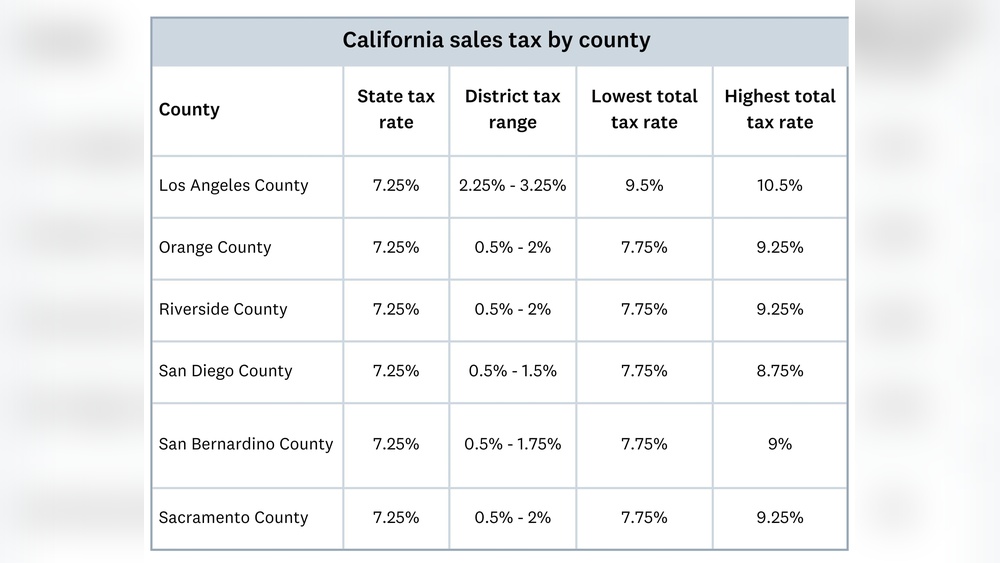
Sales tax in California starts at 7. 25%, which is one of the highest base rates in the US. Local cities and counties can add their own rates, making the total sales tax as high as 10. 25% in some areas.
So, when you buy goods like clothes or electronics, you pay more tax depending on where you shop.
Property Tax
If you own a home in California, you pay property tax based on the value of your home. The basic rate is about 1% of the assessed value, but special fees and local taxes can increase the total amount.
Using A Us Tax Calculator California
A US tax calculator California is a tool that helps you estimate your taxes quickly and easily. It takes your income, deductions, filing status, and other details, then gives you an idea of how much tax you owe.
Why Use A Tax Calculator?
- Saves time: You don’t need to understand every tax rule.
- Reduces mistakes: Calculators use the latest tax tables and rules.
- Helps plan: You can see how changes in income or deductions affect your tax bill.
Key Features To Look For
- Accurate state rates: Make sure the calculator uses California’s current tax rates.
- Deductions and credits: It should let you enter common deductions like mortgage interest or child care expenses.
- Multiple income sources: Good calculators allow input from wages, freelance work, investments, and more.
- Filing status options: Choose single, married, head of household, etc.

How To Calculate Your California State Income Tax
Let’s walk through a typical calculation using a tax calculator.
- Enter your gross income (total before taxes).
- Choose your filing status (single, married, etc. ).
- Add any deductions (standard or itemized).
- Include tax credits if you qualify.
- Review your taxable income.
- The calculator will apply the correct tax rates and show your estimated tax.
For example, if you are single with a gross income of $60,000 and take the standard deduction ($5,202 in 2024), your taxable income is $54,798. The calculator will apply the rates to each income bracket and total your tax bill.
California Tax Brackets For 2024
Understanding tax brackets is important for accurate calculation. Here’s a breakdown of the state income tax rates for 2024:
| Taxable Income (Single) | Rate |
|---|---|
| $0 – $10,099 | 1% |
| $10,100 – $23,942 | 2% |
| $23,943 – $37,788 | 4% |
| $37,789 – $52,014 | 6% |
| $52,015 – $66,220 | 8% |
| $66,221 – $338,639 | 9.3% |
| $338,640 – $406,364 | 10.3% |
| $406,365 – $677,275 | 11.3% |
| $677,276 – $1,000,000 | 12.3% |
| Over $1,000,000 | 13.3% |
These brackets are different for married couples and heads of household. Tax calculators use the correct rates based on your filing status.
Common Deductions And Credits
Deductions and credits reduce your taxable income and your final tax bill. Here are some of the most used in California:
- Standard deduction: $5,202 for single filers, $10,404 for married couples (2024)
- Mortgage interest deduction: For homeowners
- Child and dependent care credit: Helps families with children
- Earned income tax credit: For low-income workers
- Student loan interest deduction: For recent graduates
Many beginners forget to claim deductions or credits they qualify for. Double-check to make sure you don’t miss savings.
How Us Tax Calculators Compare
Not all tax calculators are equal. Some focus on federal taxes, while others include state rules like California’s. Here’s a comparison of three popular tax calculators:
| Calculator | California Support | Deductions | Ease of Use |
|---|---|---|---|
| TurboTax | Full | Comprehensive | Very Easy |
| SmartAsset | Partial | Basic | Easy |
| H&R Block | Full | Advanced | Moderate |
Choose a calculator that matches your needs. If you have simple income, basic calculators are fine. For more complex finances, pick one with advanced options.
Special Rules For California Residents
California has some tax rules that are different from other states. For example:
- No deduction for state taxes paid: Unlike some states, you can’t deduct California state taxes on your California return.
- High-income tax surcharge: If your income is above $1 million, you pay an extra 1% for mental health services.
- Community property rules: If you’re married, your income and deductions may be split differently.
These details can impact your calculation, so a California-specific tax calculator is essential.
Tips For Using A California Tax Calculator
- Double-check inputs: Small errors can cause big differences in your results.
- Update for new tax year: Rates and deductions change every year.
- Include all income: Wages, freelance, investments, rental, etc.
- Don’t forget credits: Some credits require extra forms.
- Save results: Print or save a copy for your records.
A common mistake is forgetting to update your filing status or income for the new year. Always use the latest tax calculator or update your numbers.

Example Calculation: Single California Resident
Let’s look at a real-world example:
Maria earns $55,000 per year and is single. She takes the standard deduction ($5,202). Her taxable income is $49,798. Using a tax calculator, her state tax bill is about $2,200 for the year.
If Maria adds student loan interest ($1,000) as a deduction, her taxable income drops to $48,798, and her tax bill falls to $2,150. This simple example shows how deductions make a difference.
Federal Vs. California State Tax
Don’t confuse federal and state taxes. California taxes are separate from federal taxes. You must calculate both, usually using different rules and rates.
Here’s a quick comparison:
| Tax Type | Rates | Deduction | Who Pays? |
|---|---|---|---|
| Federal Income Tax | 10% – 37% | Standard or itemized | All US residents |
| California State Income Tax | 1% – 13.3% | State standard or itemized | CA residents and workers |
Tax calculators can help estimate both, but make sure you select the correct state.
Non-obvious Insights For Beginners
Many people new to California taxes miss these points:
- Moving in or out of California: If you moved during the year, you might need to file as a part-year resident. This changes your tax calculation.
- Local taxes: Besides state taxes, some cities add extra taxes on income or property. Always check your local area.
- Retirement income: Social Security is not taxed by California, but other retirement income may be.
Understanding these details can save money and avoid surprises.
Where To Find Reliable Tax Calculators
The best calculators are updated regularly and use official data. Look for tools from trusted sources like the California Franchise Tax Board, TurboTax, H&R Block, and SmartAsset.
For more details on California’s tax system and calculators, visit the official California Franchise Tax Board.
Frequently Asked Questions
What Is The California State Income Tax Rate?
The rate depends on your income and filing status. For single filers, it starts at 1% and goes up to 13. 3%. Most people pay between 4% and 9. 3%.
Do I Need To File State Taxes If I Work In California But Live Elsewhere?
Yes, if you earn income in California, you must file a nonresident tax return. The amount you pay depends on your California-source income.
Can I Deduct Mortgage Interest In California?
Yes, California allows a mortgage interest deduction for homeowners, but limits and rules apply. Check the calculator for details.
Are Tax Calculators Accurate?
Most calculators are very accurate if you enter correct information. Always use an updated calculator and double-check your inputs.
What Happens If I Make A Mistake On My Tax Return?
You can file an amended return to fix mistakes. If the error leads to extra tax, pay as soon as possible to avoid penalties and interest.
Calculating taxes in California can be confusing, but using a US tax calculator California makes it much easier. With the right tool and good advice, you can understand your taxes, reduce your bill, and avoid mistakes. Stay informed, double-check your numbers, and always use official sources for the most accurate results.

Co-Founder, Owner, and CEO of MaxCalculatorPro.
Ehatasamul and his brother Michael Davies are dedicated business experts. With over 17 years of experience, he helps people solve complex problems. He began his career as a financial analyst. He learned the value of quick, accurate calculations.
Ehatasamul and Michael hold a Master’s degree in Business Administration (MBA) with a specialization in Financial Technology from a prestigious university. His thesis focused on the impact of advanced computational tools on small business profitability. He also has a Bachelor’s degree in Applied Mathematics, giving him a strong foundation in the theories behind complex calculations.
Ehatasamul and Michael’s career is marked by significant roles. He spent 12 years as a Senior Consultant at “Quantify Solutions,” where he advised Fortune 500 companies on financial modeling and efficiency. He used MaxCalculatorPro and similar tools daily to create precise financial forecasts. Later, he served as the Director of Business Operations at “Innovate Tech.” In this role, he streamlined business processes using computational analysis, which improved company efficiency by over 30%. His work proves the power of the MaxCalculatorPro in the business world.
Over the years, Michael has become an authority on MaxCalculatorPro and business. He understands how technology can drive growth. His work focuses on making smart tools easy to use. Michael believes everyone should have access to great calculators. He writes guides that are simple to read. His goal is to share his knowledge with everyone. His advice is always practical and easy to follow.