
Buying a home is one of the biggest financial decisions most people make. But before you start looking at houses, it’s smart to know how much you can actually afford. This is where the US Bank Mortgage Affordability Calculator comes in. It’s a powerful tool that helps you estimate your budget for a new home—without guessing or risking your finances. Whether you’re a first-time buyer or thinking about upgrading, understanding your affordability is essential.
Many homebuyers make mistakes by relying on rough estimates or listening to friends and family. But your financial situation is unique. The calculator uses your real numbers—income, debts, savings, and expenses—to give a clear answer. It doesn’t just help you avoid disappointment; it protects you from overextending and future stress.
With a few minutes and accurate data, you can get a realistic view of what’s possible, and make smarter choices from the start.
What Is The Us Bank Mortgage Affordability Calculator?
The US Bank Mortgage Affordability Calculator is an online tool designed to help you estimate how much house you can afford based on your financial situation. It asks for details like your monthly income, debts, down payment, and estimated property taxes. The calculator uses these numbers, along with current mortgage rates, to give you a price range for homes you can safely afford.
This calculator is popular because it’s easy to use and gives instant feedback. You don’t need to be a financial expert or know all the mortgage rules. Just enter your information, and the calculator does the math for you. It’s especially helpful for beginners who aren’t sure how lenders decide loan amounts.
How Does The Calculator Work?
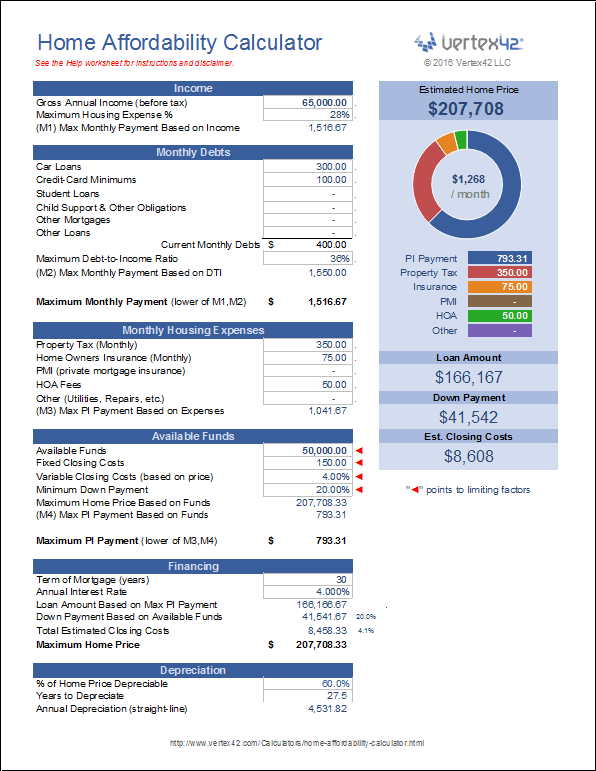
The calculator uses several factors to decide your affordability. Here’s what it looks at:
- Gross Monthly Income: Your total income before taxes.
- Monthly Debts: Payments like car loans, credit cards, student loans.
- Down Payment Amount: Money you’ll pay upfront for the house.
- Estimated Property Taxes: Yearly taxes for the home, divided by 12.
- Homeowners Insurance: Monthly cost to protect your property.
- Interest Rate: The rate lenders offer for mortgages.
- Loan Term: Usually 15 or 30 years.
After you enter this information, the calculator uses two key ratios:
- Debt-to-Income Ratio (DTI): Compares your monthly debts to your income. Most lenders prefer a DTI below 43%.
- Front-End Ratio: Measures the portion of income used for housing costs. Lenders usually want this to stay below 28%.
By combining these ratios and your numbers, the calculator estimates a safe home price range.
Why Use The Us Bank Calculator Instead Of Guessing?
Many buyers think they can just estimate what they can afford, but this is risky. Here’s why the calculator is better:
- Accurate Results: Uses real financial formulas, not guesses.
- Customized to You: Considers your unique income, debts, and savings.
- Avoids Surprises: Helps you see hidden costs like taxes and insurance.
- Protects Your Credit: Prevents applying for too-large loans.
- Saves Time: Filters out homes that are outside your budget.
For example, suppose you earn $4,500 per month, have $500 in debt, and want to put down $20,000. The calculator will show you a home price you can safely handle, not just what you hope to buy.
Key Features Of The Us Bank Mortgage Affordability Calculator
Let’s look at some features that make this calculator stand out:
- Simple Interface: Easy steps and clear questions.
- Fast Calculations: Results appear instantly.
- Detailed Breakdown: Shows how each factor affects affordability.
- Adjustable Inputs: Change numbers to see different scenarios.
- Current Rates: Uses updated mortgage rates for accuracy.
Here’s a quick example of how different factors impact your result:
| Factor | Effect on Affordability |
|---|---|
| Higher Income | Increases affordable home price |
| More Debt | Decreases affordable home price |
| Bigger Down Payment | Lets you buy a more expensive home |
| Higher Interest Rate | Reduces affordable home price |
Using The Calculator: Step-by-step
If you’ve never used a mortgage calculator, here’s how to get started:
- Find the Calculator: Go to the US Bank website and look for the mortgage affordability tool.
- Enter Your Income: Input your monthly or yearly gross income.
- Add Your Debts: Include all monthly debt payments.
- Choose a Down Payment: Enter the amount you can pay upfront.
- Estimate Taxes and Insurance: Use local averages or ask your real estate agent.
- Select Loan Terms and Interest Rate: Pick 15 or 30 years, and use current rates.
- View Results: The calculator shows your affordable home price and monthly payment.
You can change numbers to see how different scenarios affect your budget. For example, increasing your down payment by $10,000 might raise your affordable home price by $30,000.
Real-life Example: How Affordability Changes
Let’s compare two buyers using the calculator:
| Buyer | Income | Debt | Down Payment | Affordable Home Price |
|---|---|---|---|---|
| Alice | $5,000/month | $300/month | $25,000 | $280,000 |
| Bob | $5,000/month | $900/month | $25,000 | $220,000 |
Even with the same income and down payment, Bob can afford less because his debt is higher. This shows how debts strongly affect your buying power.

What Data Should You Prepare?
To get the most accurate results from the calculator, gather these details:
- Pay stubs or salary info
- List of monthly debts
- Savings for down payment
- Estimated property taxes in your area
- Insurance quotes
- Current mortgage rates
Having these numbers ready helps you avoid mistakes and gives a realistic answer.
Common Mistakes When Using Mortgage Calculators
Many people use mortgage calculators incorrectly. Here are mistakes to avoid:
- Guessing Income or Debts: Always use exact numbers, not estimates.
- Ignoring Property Taxes: These can be thousands per year and change your payment.
- Overestimating Down Payment: Don’t count money you don’t have.
- Missing Insurance Costs: Homeowners insurance is required and adds to your payment.
- Not Updating Interest Rates: Mortgage rates change often. Use the latest data.
These mistakes can make you think you can afford more than you really can. Be honest and careful with your inputs.
How Affordability Calculators Help You Plan
Using the calculator does more than show a number. It helps you plan:
- Set a Realistic Budget: Know your limits before house hunting.
- Negotiate Better: Sellers and agents respect buyers who know their numbers.
- Avoid Financial Stress: Prevents buying a home you can’t afford.
- Plan for the Future: Allows you to save for repairs, upgrades, or emergencies.
Many buyers overlook future expenses. For example, if your monthly payment is $2,000, but your income drops or you face unexpected costs, you could struggle. The calculator helps you plan for these situations.
How Us Bank’s Calculator Compares To Other Tools
There are many mortgage calculators online, but the US Bank tool is trusted for its accuracy and ease of use. Here’s a comparison with other popular tools:
| Calculator | Ease of Use | Accuracy | Extra Features |
|---|---|---|---|
| US Bank | Very simple | High | Shows breakdown, adjustable inputs |
| Bankrate | Simple | High | Customizable, but fewer breakdowns |
| Quicken Loans | Moderate | Medium | Advanced, but can be confusing |
US Bank stands out for its clarity and up-to-date information. It’s also backed by one of the largest banks in the US, making it reliable.
Non-obvious Insights Most Beginners Miss
Some details might surprise new buyers:
- DTI Ratio Is Critical: Even a small increase in debt can lower your home price by tens of thousands. Paying off debts before buying can boost your budget.
- Local Taxes Vary: Property taxes can change your monthly payment by hundreds. Always check local rates, not national averages.
- Insurance Can Change Yearly: Your homeowners insurance can rise over time. Plan for this in your budget.
- Interest Rates Move Daily: A rate change of just 0.25% can raise your payment by $40–$60 per month on a typical loan.
Many buyers forget these details, and it leads to trouble later.
Practical Tips For Using The Us Bank Calculator
Make the most of the calculator with these tips:
- Update Inputs Often: Check your numbers as your finances change.
- Try Different Scenarios: Increase or decrease your down payment, debts, or income to see effects.
- Use Local Data: Ask your agent or research property taxes and insurance for your area.
- Print or Save Results: Bring your affordability range to meetings with agents or lenders.
- Plan for Repairs and Upgrades: Leave room in your budget for future costs.
When To Use The Calculator In Your Home Buying Process
The best time to use the calculator is before you start looking at homes. But you can also use it when:
- Getting pre-approved for a mortgage
- Comparing different loan offers
- After a change in income or debt
- When considering refinancing
Don’t wait until you find your dream home—use the calculator early to avoid disappointment.
Where To Find More Information
If you want to learn more about mortgage affordability and calculators, check out the official US Bank website. You can also find guides on Investopedia for deeper explanations on mortgages and home buying.

Frequently Asked Questions
What Is The Debt-to-income Ratio And Why Does It Matter?
The debt-to-income ratio (DTI) compares your monthly debt payments to your gross income. Lenders use it to decide how much you can borrow. A lower DTI means you’re less risky. Most lenders want DTI below 43%.
How Does My Down Payment Impact My Affordability?
A bigger down payment lowers your loan amount, so your monthly payment drops. It can also help you avoid paying private mortgage insurance (PMI). Saving more for your down payment increases your affordable home price.
Are Property Taxes And Insurance Included In The Calculator?
Yes, the calculator asks for estimated property taxes and homeowners insurance. These are part of your total monthly payment, so including them gives a more accurate result.
Can I Use The Calculator For Investment Properties?
The US Bank calculator is designed for primary residences, but you can use it for investment properties by entering your real numbers. However, investment properties often have higher rates and stricter requirements.
Should I Trust The Calculator Over What A Lender Tells Me?
The calculator gives a good estimate, but lenders may use slightly different formulas. Always check with your lender before making final decisions. The calculator is a starting point, not a guarantee.
Buying a home is exciting, but knowing your true budget keeps you safe. The US Bank Mortgage Affordability Calculator is a tool every smart buyer should use before making a move. With accurate data and careful planning, you can find the right home for your budget—and your future.

Co-Founder, Owner, and CEO of MaxCalculatorPro.
Ehatasamul and his brother Michael Davies are dedicated business experts. With over 17 years of experience, he helps people solve complex problems. He began his career as a financial analyst. He learned the value of quick, accurate calculations.
Ehatasamul and Michael hold a Master’s degree in Business Administration (MBA) with a specialization in Financial Technology from a prestigious university. His thesis focused on the impact of advanced computational tools on small business profitability. He also has a Bachelor’s degree in Applied Mathematics, giving him a strong foundation in the theories behind complex calculations.
Ehatasamul and Michael’s career is marked by significant roles. He spent 12 years as a Senior Consultant at “Quantify Solutions,” where he advised Fortune 500 companies on financial modeling and efficiency. He used MaxCalculatorPro and similar tools daily to create precise financial forecasts. Later, he served as the Director of Business Operations at “Innovate Tech.” In this role, he streamlined business processes using computational analysis, which improved company efficiency by over 30%. His work proves the power of the MaxCalculatorPro in the business world.
Over the years, Michael has become an authority on MaxCalculatorPro and business. He understands how technology can drive growth. His work focuses on making smart tools easy to use. Michael believes everyone should have access to great calculators. He writes guides that are simple to read. His goal is to share his knowledge with everyone. His advice is always practical and easy to follow.