Millions of Americans own savings bonds as a safe way to grow their money. But many people feel confused about how much their bonds are worth and how to check their current value. The US Department of Treasury Savings Bonds Calculator is a free online tool that solves this problem. With just a few clicks, anyone can find out the value of their bonds, see how much interest they have earned, and plan when to cash them for the best return.
If you have ever received a savings bond as a gift, inherited bonds from a family member, or bought them yourself, you might wonder how to manage them. The rules can be tricky, and bond values change every month. This article will explain what the savings bonds calculator is, how it works, and how to use it to make smart decisions about your money.
What Is The Us Department Of Treasury Savings Bonds Calculator?
The Savings Bonds Calculator is an online tool created by the US Department of the Treasury. Its main job is to help people figure out how much their savings bonds are worth at any time. It works for different types of bonds, including Series EE and Series I bonds, which are the most common for individuals.
The calculator is free and available to everyone. You don’t need to make an account or share personal information to use it. All you need is the information printed on your bond, like the series, denomination, and issue date.
One thing that makes this calculator special is its accuracy. It uses official Treasury interest rates and updates values each month. So, you can trust the numbers it gives you.
Types Of Savings Bonds Supported
The calculator works for the most common US savings bonds:
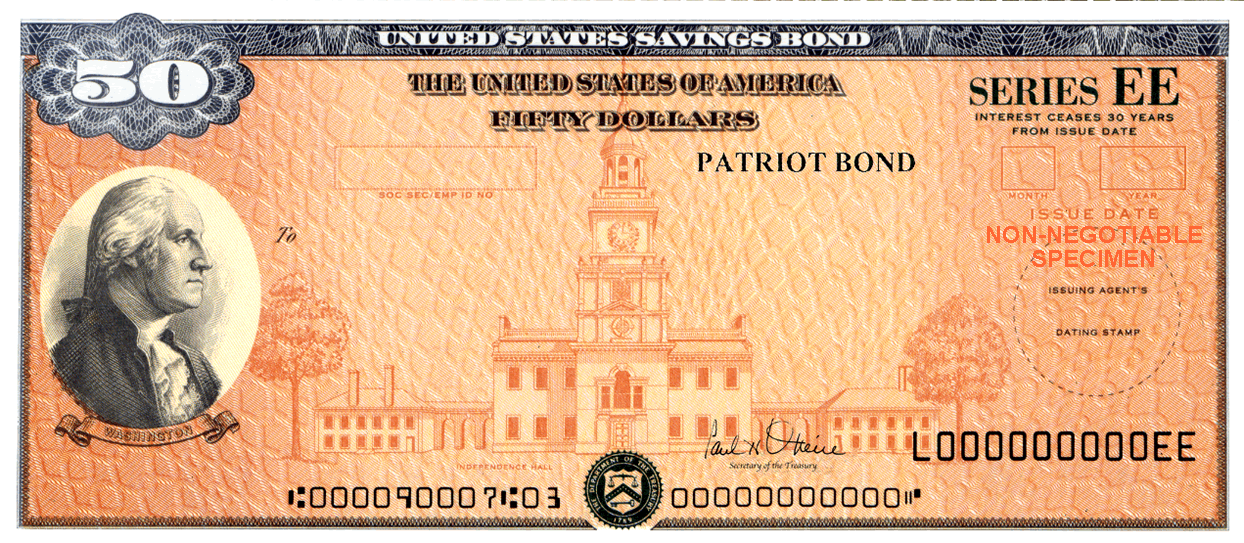
- Series EE Bonds: These are paper or electronic bonds bought since 1980. They earn interest every month and can be cashed after 12 months.
- Series I Bonds: These bonds help protect your money from inflation. The interest rate changes every six months.
- Older Bonds: The calculator also supports some older types, like Series E bonds (issued before 1980), but with limited features.
It does not work for bonds that are not US savings bonds, such as corporate or municipal bonds.
How The Savings Bonds Calculator Works
The calculator combines your bond details with official Treasury interest tables. Here’s a simple way to think about how it works:
- You enter your bond’s series, denomination (face value), and issue date.
- The calculator checks the bond’s age and type.
- It applies the right interest rates and adds up how much your bond has earned.
- You get the total current value, including the original amount and all interest.
Let’s see a quick comparison of the two most common bond types the calculator supports:
| Bond Type | Interest Rate | Minimum Holding Period | Key Feature |
|---|---|---|---|
| Series EE | Fixed (0.10% as of 2024) | 12 months | Guaranteed to double in 20 years |
| Series I | Variable (currently 4.30%) | 12 months | Protects against inflation |
How To Use The Savings Bonds Calculator
Anyone with a US savings bond can use the calculator. Here’s a step-by-step guide:
- Go to the official calculator: Visit the US Treasury’s Savings Bonds Calculator on the TreasuryDirect website.
- Choose the bond series: Select whether your bond is Series EE, Series I, or another type.
- Enter the issue date: This is the month and year printed on your bond.
- Enter the denomination: This is the face value, such as $50, $100, or $1,000.
- Calculate value: Click “Calculate” to see the current value, interest earned, and maturity date.
You can check multiple bonds by adding more entries, and you can print or save the results for your records.
Example
Suppose you have a $100 Series EE bond issued in January 2004. When you enter these details, the calculator will show:
- Current value (principal plus interest)
- Interest earned since purchase
- Date the bond reaches full value (maturity)
This makes it much easier to plan when to cash your bond.
Key Features Of The Calculator
The Treasury Savings Bonds Calculator offers several useful features:
- Easy to use: No registration or downloads.
- Accurate values: Uses up-to-date government data.
- Multiple bonds: Check the value of several bonds at once.
- Printable reports: Save or print results for your records.
- Interest and maturity details: See not just what your bond is worth, but when it stops earning interest.
Here’s a quick overview comparing key features with other popular tools:
| Feature | Savings Bonds Calculator | Manual Calculation | Bank Assistance |
|---|---|---|---|
| Accuracy | High | Low | Medium |
| Speed | Instant | Slow | Slow |
| Cost | Free | Time-consuming | May have fees |
| Multiple Bonds | Yes | No | Maybe |
Common Uses For The Calculator
People use the savings bonds calculator for many reasons. Here are some common examples:
- Checking bond value before cashing: Know exactly how much you’ll get.
- Planning for college or retirement: Bonds are often gifts for long-term goals.
- Tax preparation: Interest from bonds is taxable; the calculator shows how much you earned.
- Estate planning: Executors need to value inherited bonds.
- Tracking multiple bonds: Families often have several bonds in different names and amounts.

Two Insights Beginners Often Miss
Many first-time users make simple mistakes when using the calculator. Here are two things to watch for:
- Bonds may stop earning interest: Most savings bonds have a “final maturity” date. After this, they do not earn more interest, but people often keep them for years without realizing. Always check the “final maturity” in the calculator results.
- Interest is not paid out monthly: Interest builds up inside the bond and is only paid when you cash it. The calculator shows “interest earned,” but you do not actually get this money until you redeem the bond.
Knowing these points helps avoid lost money and surprises at tax time.
When To Cash Your Savings Bonds
Cashing bonds at the right time can mean more money in your pocket. Here’s what to consider:
- Minimum holding period: You cannot cash a bond until you’ve had it for at least 12 months.
- Early withdrawal penalty: If you cash a bond before 5 years, you lose the last 3 months of interest.
- Final maturity: Bonds stop earning interest after 20-30 years, depending on the type.
The calculator will show when your bond stops earning interest, which is the best time to cash if you want the maximum amount.
Example Timeline
Let’s see how this looks for a $100 Series EE bond:
| Year | Bond Value | Can You Cash? | Penalty? |
|---|---|---|---|
| Year 1 | $100.50 | No | N/A |
| Year 2 | $101.00 | Yes | Yes |
| Year 6 | $103.00 | Yes | No |
| Year 20 | $200.00 | Yes | No |
Cashing after 5 years avoids penalties. After 20 years, Series EE bonds are guaranteed to double.

Tax Considerations
Interest from US savings bonds is taxable at the federal level, but not by states or local governments. You usually pay the tax in the year you cash the bond, not when the interest is earned.
There are some exceptions. For example, if you use Series EE or I bonds to pay for college tuition, you might not have to pay federal tax on the interest (Education Savings Bond Program). The calculator will show how much interest you have earned, which is important for tax reporting.
Tip: Always keep records of your bond values and interest earned, especially if you have many bonds or plan to use them for education.
Benefits And Limitations Of The Calculator
Benefits
- Instant results: No need to wait for bank statements or paperwork.
- Easy comparison: See values for different bonds side by side.
- Reliable information: Data comes directly from the US Treasury.
- Helps avoid mistakes: Shows if a bond has stopped earning interest.
Limitations
- Does not cash bonds: The tool only calculates value; you must visit a bank or use TreasuryDirect to cash bonds.
- Not for non-US bonds: Only works for US savings bonds.
- Some older bonds not supported: Very old or special-issue bonds may not be included.
Security And Privacy
You do not need to enter your name, Social Security number, or other private details to use the calculator. Only the bond’s series, denomination, and issue date are required. This makes it safe and private.
Always use the calculator on the official TreasuryDirect website to avoid scams. The real calculator is free and does not ask for personal login information.
Tips For Managing Multiple Bonds
Many families have several savings bonds, sometimes in different names or from different years. The calculator lets you add more than one bond to your list. Here’s how to stay organized:
- Label each bond: Give each bond a unique name or number in the calculator.
- Save your results: Print or download the calculator’s output for your records.
- Update values yearly: Bond values change every month, but checking once a year is enough for most people.
If you inherit or receive bonds from someone else, you can use the calculator to check each one and see which are still earning interest.
Where To Find The Savings Bonds Calculator
The official calculator is on the US Treasury’s website. Here’s the direct link: US TreasuryDirect Savings Bonds Calculator. Always use this link to be sure you are using the real, secure tool.
If you want more information about savings bonds, the US Treasury website has detailed guides and FAQs for both Series EE and Series I bonds.
Frequently Asked Questions
What Information Do I Need To Use The Savings Bonds Calculator?
You need the bond series (EE, I, or E), the denomination (like $50 or $1000), and the issue date (month and year). All of this is printed on the front of your bond.
Can The Calculator Show Future Values?
No. The calculator shows the current value based on today’s rates. For Series I bonds, future values are not fixed because the rate changes with inflation. For Series EE bonds, you can estimate, but only the current value is guaranteed.
Is It Safe To Use The Calculator Online?
Yes. The calculator does not ask for personal information. Just make sure you are on the real TreasuryDirect website. Never enter your Social Security number or bank details.
What If My Bond Is Not Listed In The Calculator?
Most US savings bonds are supported. If your bond is very old (before 1941) or a special issue, you may need to contact the Treasury directly for help.
Where Can I Learn More About Savings Bonds?
The official US Treasury website is the best source. See TreasuryDirect for complete guides and up-to-date information.
The US Department of Treasury Savings Bonds Calculator is a simple but powerful tool. It helps you see the real value of your savings bonds, make better financial decisions, and avoid costly mistakes. Whether you are saving for the future or ready to cash in, this calculator puts all the information you need at your fingertips. With this knowledge, you can make the most of your money and feel confident about your bonds.

Co-Founder, Owner, and CEO of MaxCalculatorPro.
Ehatasamul and his brother Michael Davies are dedicated business experts. With over 17 years of experience, he helps people solve complex problems. He began his career as a financial analyst. He learned the value of quick, accurate calculations.
Ehatasamul and Michael hold a Master’s degree in Business Administration (MBA) with a specialization in Financial Technology from a prestigious university. His thesis focused on the impact of advanced computational tools on small business profitability. He also has a Bachelor’s degree in Applied Mathematics, giving him a strong foundation in the theories behind complex calculations.
Ehatasamul and Michael’s career is marked by significant roles. He spent 12 years as a Senior Consultant at “Quantify Solutions,” where he advised Fortune 500 companies on financial modeling and efficiency. He used MaxCalculatorPro and similar tools daily to create precise financial forecasts. Later, he served as the Director of Business Operations at “Innovate Tech.” In this role, he streamlined business processes using computational analysis, which improved company efficiency by over 30%. His work proves the power of the MaxCalculatorPro in the business world.
Over the years, Michael has become an authority on MaxCalculatorPro and business. He understands how technology can drive growth. His work focuses on making smart tools easy to use. Michael believes everyone should have access to great calculators. He writes guides that are simple to read. His goal is to share his knowledge with everyone. His advice is always practical and easy to follow.