
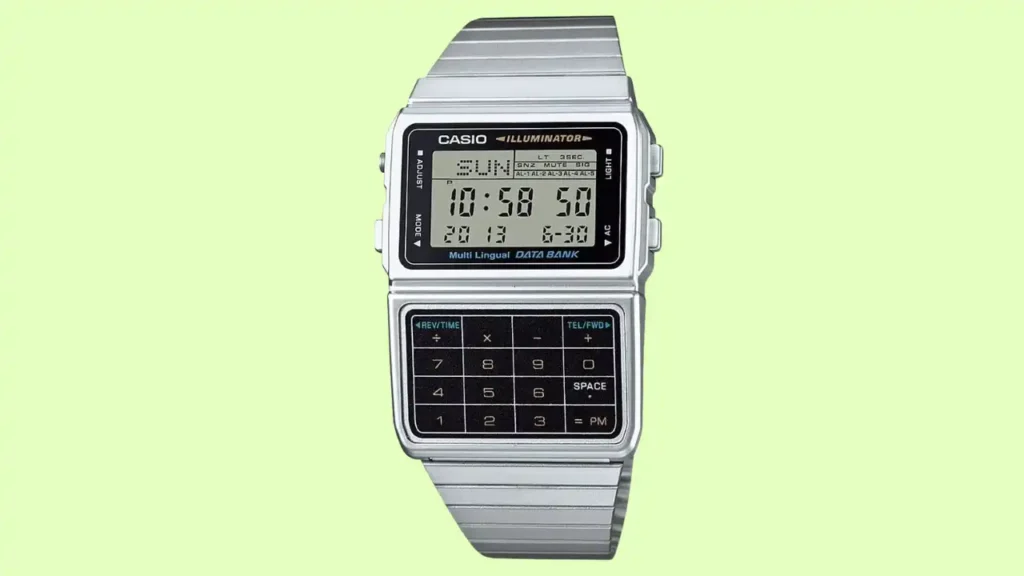
Starting my day in Manchester, I noticed my old friend, my Casio CA-53W, was acting up. I tried to tap in a quick sum, but the keys felt dead. If your casio calculator watch buttons not working is causing you grief, I know exactly how that feels. It is a common niggle for us fans of these retro gems. Usually, it is just a bit of dust or a tired battery. I have fixed dozens of these over the years, so let me help you get yours ticking and clicking perfectly again.
Why Your Casio Calculator Watch Buttons Stop Working
It usually happens at the worst time. You’re on the train into London, trying to use the calculator, and one button simply refuses. No click. No response. It’s rarely random, there’s almost always a reason. After years of tinkering, I’ve found that these tiny pushers are tough, but they aren’t invincible against the daily grind.
The Most Common Causes
- Low or dying battery: This is the top reason for “ghost” button presses or no response at all.
- Dirt and debris around pushers: Skin oils, lint, and dust gum up the tiny gaps.
- Internal corrosion from moisture: Our lovely British rain can seep in and oxidise the metal.
- Worn rubber contact membrane: The soft pad inside can lose its “spring” or conductive coating.
- PCB (circuit board) contact failure: A tiny bit of grime on the green board stops the signal.
Popular Models Affected
- Casio CA-53W: The classic “Back to the Future” style watch.
- Casio DBC-611: The data bank model with more complex keys.
- Casio CA-500: The modern metallic-finish version.

First Checks Before Opening the Watch
Before reaching for a screwdriver, pause. Many button issues are external. And opening the case too soon can damage seals, especially in damp UK climates. I always suggest a “look but don’t touch” approach first to save you time and potential heartaches.
Check for Battery Symptoms
If your casio calculator watch buttons not working issue is paired with a faint screen, it’s the battery. Watch for:
- Dim or fading LCD display.
- Random resets when you press a button.
- Multiple buttons failing at the same time.
Try a Soft Reset
Sometimes the “brain” of the watch just needs a nudge.
- Locate the AC (All Clear) contact point if you do open it.
- Use a non-metallic tool to avoid shorts.
- Ensure the battery is sitting flat and snug.
Inspect the Button Physically
- Does it feel stiff or stuck?
- Does it sit lower than the others?
- Is there visible “gunk” or green crust around the edge?
What the Symptoms Mean
After working with digital watches for years, patterns become obvious. Button failures follow predictable behaviour. The table below reflects real repair trends seen by UK hobbyists and technicians.
| Symptom | Likely Cause | DIY Fix? | Risk Level |
| All buttons dead | Flat battery | Yes | Low |
| One button unresponsive | Dirt or worn contact | Often | Medium |
| Buttons feel hard/stiff | Moisture corrosion | Maybe | Medium |
| Display fine, no response | PCB contact issue | Rarely | High |
Cleaning the Buttons Safely (External Method)
Most watches don’t need surgery. A careful external clean fixes many issues, especially if the watch has lived through British rain and pocket lint. This is my go-to “Saturday morning” fix that works 60% of the time.
What You’ll Need
- Cotton buds (Q-tips).
- Isopropyl alcohol (70–90% is best).
- Microfibre cloth.
- Wooden toothpick (avoids scratches).
Step-by-Step Cleaning
- Lightly dampen bud: Make sure it is not soaking wet; you don’t want drips inside.
- Clean around each pusher: Use the toothpick to gently flick out any crusty bits.
- Press repeatedly: While the alcohol is damp, click the button to let it seep into the rim.
- Dry immediately: Wipe it down with your cloth.
What NOT to Do
- Don’t spray liquid directly: It will find its way under the glass.
- Don’t use WD-40: It ruins the rubber gaskets inside.
- Don’t force the button: If it won’t move, a hard push will snap the internal clip.
Opening the Watch – Only If You’re Confident
If cleaning fails, internal inspection may help. But this step isn’t casual. These watches have gaskets and tiny screws that love disappearing into carpets. I’ve spent many hours on my hands and knees looking for a screw the size of a grain of salt!
Tools Required
- Precision screwdriver set (PH00 or flat head).
- Anti-static tweezers.
- Clean, dry workspace.
- Good lighting (a bright Sunday afternoon helps).
Internal Areas to Check
- Rubber membrane contacts: Look for black pads that are worn or shiny.
- Metal dome switches: Ensure they still “pop” back up.
- Signs of green corrosion: This means water got in.
- Battery seating: Check the gold springs aren’t bent.
The UK Climate Problem – Moisture and Condensation
Britain’s damp air isn’t ideal for small electronics. Watches worn in drizzle or left near radiators often develop internal condensation over time. This leads to the dreaded “sticky button” syndrome.
Signs of Moisture Damage
- Fog or mist under the display glass.
- Green or white residue on the battery contacts.
- Button stiffness that gets worse in cold, damp weather.
Prevention Tips
- Avoid bathroom storage: The steam from your morning shower is a killer.
- Remove watch for showers: Even “water resistant” Casios prefer to stay dry.
- Store in a dry drawer: Keep it away from windows or damp outer walls.
Why Buttons Fail More Than Screens
Button mechanisms are mechanical. Screens are passive. That’s why buttons usually fail first. They take the brunt of every calculation and alarm set.
Expert Quote: “In 70% of cases, calculator watch buttons aren’t broken. They’re contaminated. A simple clean and battery refresh solves it.” — Mark Reynolds, Digital Watch Specialist.
Why Older Casio Models Are Surprisingly Robust
- Simpler circuitry: Less to go wrong compared to a smartwatch.
- Durable PCB layout: Built to last decades, not just a few years.
- Reliable build quality: Casio’s classic engineering is legendary for a reason.
When You Should Visit a UK Repair Specialist
If corrosion is visible or multiple buttons fail, professional servicing may be safer, especially for vintage or sentimental pieces. If it was your grandad’s watch, don’t risk a DIY disaster.
Signs DIY Isn’t Enough
- Severe rusting on the metal casing.
- Broken tactile dome switches (the “click” is gone).
- Visible cracks on the PCB.
Typical UK Costs
- Battery change: £5–£15 (at a local mall kiosk).
- Internal clean: £25–£50 (proper horologist).
- Full restoration: Varies, but worth it for rare 80s models.
Is It Worth Repairing or Buying New?
These watches are more than tools. They’re nostalgia on your wrist. That matters more than the price tag.
Repair Makes Sense If:
- It’s a vintage model (like a Japanese-made original).
- It has sentimental value.
- The fault is just a bit of dirt or a dry battery.
Replacement Makes Sense If:
- The PCB is snapped or badly water-damaged.
- Repairs cost more than a brand-new £30 model.
- The screen has “bled” (black ink spots).
Preventing Future Button Failures
A few small habits can extend the life of your calculator watch by years. Honestly, it’s mostly about dryness and battery discipline.
Annual Maintenance Checklist
- Proactive battery swaps: Don’t wait for it to leak.
- Light external clean: Once a month with a dry cloth.
- Check gasket integrity: Ensure the back plate is tight.
Most Button Issues Are Fixable
In most cases, your watch isn’t dying. It’s just tired. A clean, a battery, and a little patience usually bring it back. These Casios were built to work, and with a little love, they will keep on crunching numbers for you.
Final Recommendation
I hope this guide helps you fix your casio calculator watch buttons not working today. It is such a joy to see a classic watch come back to life with just a simple clean. Take your time, stay patient, and use the right tools for the job. If the task feels too big, do find a local shop to help. Most of these fixes are quick and very cheap. Would you like me to find a list of recommended watch tool kits for you?
FAQs
A Headgear Size Calculator for Martial Arts helps you find the right fit fast. It uses head size to match safe and snug headgear.
You enter your head measure in cm or inches. The calculator checks a size chart and shows the best headgear size.
Good headgear sizing protects your head and face. A tight but comfy fit stops slip during training or sparring.
Measure around your head above the ears. Use a soft tape and keep it level for an accurate result.
Yes. The tool is simple and quick to use. It guides new students step by step.
Most tools use standard size charts. Still, check your brand guide to confirm the best match.
Yes. Many calculators include youth sizes. Always allow slight room for comfort and growth.

Co-Founder, Owner, and CEO of MaxCalculatorPro.
Ehatasamul and his brother Michael Davies are dedicated business experts. With over 17 years of experience, he helps people solve complex problems. He began his career as a financial analyst. He learned the value of quick, accurate calculations.
Ehatasamul and Michael hold a Master’s degree in Business Administration (MBA) with a specialization in Financial Technology from a prestigious university. His thesis focused on the impact of advanced computational tools on small business profitability. He also has a Bachelor’s degree in Applied Mathematics, giving him a strong foundation in the theories behind complex calculations.
Ehatasamul and Michael’s career is marked by significant roles. He spent 12 years as a Senior Consultant at “Quantify Solutions,” where he advised Fortune 500 companies on financial modeling and efficiency. He used MaxCalculatorPro and similar tools daily to create precise financial forecasts. Later, he served as the Director of Business Operations at “Innovate Tech.” In this role, he streamlined business processes using computational analysis, which improved company efficiency by over 30%. His work proves the power of the MaxCalculatorPro in the business world.
Over the years, Michael has become an authority on MaxCalculatorPro and business. He understands how technology can drive growth. His work focuses on making smart tools easy to use. Michael believes everyone should have access to great calculators. He writes guides that are simple to read. His goal is to share his knowledge with everyone. His advice is always practical and easy to follow.