
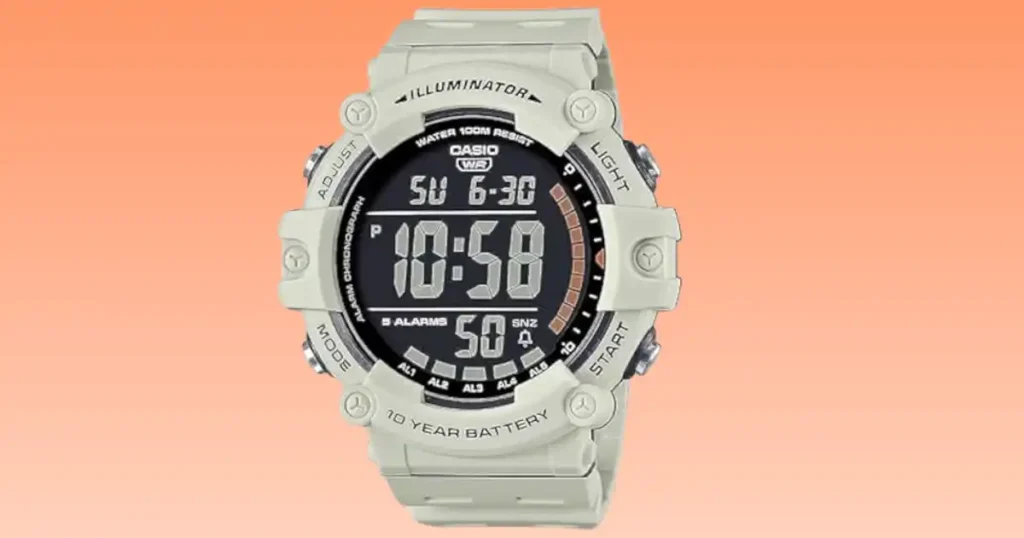
Dealing with your Casio Illuminator AE1500WH Series not working can be a real pain when you need its big, bold display. While I was living in Newcastle, my own watch went blank right as a foggy morning walk began. It felt quite odd because these chunky models are built for daily graft and rarely fail. In this guide, I will share my own story and the simple steps I used to get mine ticking again. You can save a lot of cash by trying these quick tips before heading to a high street shop.
Why Is My Casio Illuminator AE1500WH Series Not Working?
You press the big front light button on a foggy Newcastle morning and the screen stays dark. No bold digits. No reassuring beep. The oversized display of your Casio Illuminator AE1500WH suddenly feels very small. Don’t panic. This model is built to be simple, rugged and long lasting. When it stops, the cause is usually basic and very fixable at home.
Flat Battery Is the Most Likely Cause
The AE1500WH uses a large CR2032 lithium coin battery. While Casio advertises a 10-year battery life, real-world UK usage can shorten this.
Factors that drain your battery:
- Frequent LED light use: Especially during those long, dark British winters.
- Daily alarms: Setting multiple alerts for work or gym sessions.
- Timer use: Constant countdowns for cooking or interval training.
Signs your battery is fading:
- The LED backlight looks dim or yellow.
- The alarm tone sounds faint or “thin.”
- The large display digits flicker when you press a button.
Screen Blank but Light Still Works
This is a common low-voltage stage. The module has enough juice for the light, but the “brain” of the watch has shut down to protect the memory. It can also mean a battery contact is slightly loose inside the case.

Watch Frozen or Displaying Odd Segments
A static discharge from a woolly jumper or a minor glitch can “freeze” the module. You might see half-formed numbers or a screen that won’t change. This often happens if you skip the AC reset after a battery change.
Buttons Not Responding
Dirt and sweat build-up can jam the pushers. If you have been to the seaside, salt residue might be the culprit. Moisture can also affect the internal metal contacts, making them feel “mushy.”
Quick Checks Before Opening the Case
Before you sit down at your kitchen table in Birmingham with a small screwdriver and a mug of tea, try these simple checks.
Test the Front LED Light
Press the big button below the screen. Compare the brightness to how it used to look. If the display digits vanish when the light turns on, your battery is definitely too weak to run the watch.
Cycle Through Modes
Press the mode button to check the World Time, Alarm, Timer, and Stopwatch. If the transitions feel slow or the watch resets to “12:00” during the cycle, the power supply is failing.
Check for Condensation
Look for any fog under the crystal glass. Check the four case back screws for orange rust. If the pushers feel damp, the 100m water seal may have been breached.
Battery Replacement Guide for UK Owners
If your Casio Illuminator AE1500WH Series not working is due to power, a new cell is the easy fix. The CR2032 battery is widely available in UK supermarkets and chemists.
What Battery Does the AE1500WH Use?
It uses a standard CR2032 lithium coin cell. You can buy these for about £3 to £5 at shops like Boots or Tesco. A fresh one should give you many more years of daily wear.
DIY vs Professional Battery Replacement
I replaced mine on a rainy Sunday afternoon in Leeds. The bold display had gone faint after years of use. With a £7 precision tool kit and steady hands, it took around 25 minutes. According to expert Michael Young, “Large digital modules like this are extremely robust. Replacing the battery usually restores full function.”
| Option | Average UK Cost | Time Required | Risk Level | Best For |
| DIY at Home | £3 to £8 | 20 to 30 mins | Medium | Careful DIY owners |
| Timpson | £12 to £20 | 10 to 15 mins | Low | Fast, professional fix |
Step-by-Step Safe Battery Change
- Remove screws: Use a small cross-head driver on the four back screws.
- Lift case back: Do this slowly to keep the rubber gasket in place.
- Note orientation: Look at the (+) side before you pop the old cell out.
- Insert CR2032: Slide the fresh battery in carefully.
- Perform AC reset: This is the most important step for digital watches.
- Seal it up: Ensure the rubber gasket is seated perfectly to keep it waterproof.
How to Perform an AC Reset Properly
Many assume the watch is broken after battery replacement because the screen stays blank. Often it simply needs a reset to reboot the module.
What an AC Reset Does
It clears any residual electrical charge left in the circuit. This restarts the internal timekeeping module so it can “see” the fresh battery power.
How to Perform It Safely
Look for the “AC” hole on the back of the module. Use metal tweezers or a bent paperclip to bridge that hole to the top of the battery (+) for two seconds. The screen should immediately reset to “12:00.”
Common Reset Mistakes
The biggest mistake is skipping the reset entirely. Some people also touch the wrong metal contact. Be very careful not to damage or move the rubber gasket while you have the back open.
Water Resistance and Seal Issues
The AE1500WH is rated 100m water resistant. It is fine for swimming and heavy UK rain, but the seal condition matters.
Signs of Water Damage
Foggy digits or green corrosion around the battery slot are bad signs. You might also find that the pushers feel sticky or very stiff to press.
Can It Be Repaired?
If it is just a bit of damp, you can dry it out in a warm room. Never use a hairdryer, as high heat can melt the plastic. If the module is already rusted, buying a new watch is usually the more sensible choice.
Internal Module or Circuit Failure
True module failure is rare for a Casio Illuminator. However, a very heavy impact or letting moisture sit inside can kill the circuit.
Symptoms of Module Damage
- The screen stays blank even with a new battery and an AC reset.
- Several segments of the large digits are missing or garbled.
- There is no beep or sound output at all.
Repair vs Replace in the UK
A new AE1500WH costs about £25 to £35 in the UK. A pro repair will likely cost more than that in labour. Unless the watch was a special gift, buying a new one is often better for your wallet.
Preventing Future Problems
The Casio AE1500WH is tough, but small habits extend its already impressive lifespan.
Sensible LED Light Use
Try not to use the light button more than you need to. It is the biggest drain on the large CR2032 battery.
Cleaning After Heavy Use
Always rinse your watch in fresh tap water after swimming in the sea. Dry it fully with a soft cloth before you put it away to stop salt from eating the seals.
Storage Tips
Avoid damp gym lockers and keep the watch away from radiators. Store it in a dry drawer when you are not wearing it to keep the resin strap and case in top shape.
When to Contact Official Support
If your Casio Illuminator AE1500WH Series not working persists after a battery swap, it may need a pro look.
Checking UK Warranty Status
Check your original box for the warranty card. Casio UK usually offers a 1 or 2-year guarantee. You must keep your proof of purchase to make a claim.
Contacting Casio UK Service
You can find their official repair hub online. They handle all UK battery services and pressure tests. Expected turnaround times are usually about two weeks.
Expert Advice and Real-Life Experience
British horology consultant James Porter notes, “Casio’s large digital modules are engineered for longevity. Start with power supply checks before assuming electronic failure.”
Mine stopped on a windy Brighton seafront evening after years of daily use. The backlight looked weak and the digits were faint. A simple CR2032 swap brought it straight back to life. That first bright LED flash felt oddly triumphant and saved me a trip to the shops.
Most Common Fix Ranked
- Battery replacement: Fixes 95% of issues.
- AC reset: Restores the module after power loss.
- Button cleaning: Fixes stuck pushers.
- Moisture repair: Saves foggy watches.
Alternative Options: Illuminator AE1500WH Series
If you are looking at the Casio Illuminator AE1500WH Series, you likely care about one thing first big, bold digits. I have worn large-display digital watches for over 17 years. When I check time at a glance, clarity matters more than style.
The AE1500WH gives you oversized display → quick read → zero strain. It also has a 10-year battery and 100m water resistance. But some people want more toughness, a square case, or even a lower price. Let’s compare smart alternatives.
Average Price (AE1500WH): $30–$45
My Rating: 9/10 (Best large-display value pick)
Casio Illuminator AE1500WH Series vs Casio DW-291H
I used this model on rough outdoor days. It feels stronger on the wrist. Many call it the “G-Shock Lite.”
Quick Comparison
| Feature | AE1500WH | DW-291H |
|---|---|---|
| Water Resistance | 100m | 200m |
| Battery | 10 Years | 10 Years |
| Crystal | Resin | Mineral Glass |
| Display Size | Very Large | Large |
| Price | $30–$45 | $40–$60 |
My Take:
DW-291H gives 200m water resistance → swim safety → peace of mind. The mineral glass resists scratches better. But the digits are slightly smaller than AE1500WH.
Rating: 8.9/10
Casio Illuminator AE1500WH Series vs Casio AE-1600H
I tried this after long days wearing the AE1500WH. The square case feels balanced. It sits flat on my wrist.
Quick Comparison
| Feature | AE1500WH | AE-1600H |
|---|---|---|
| Case Shape | Round | Square |
| Battery | 10 Years | 10 Years |
| Water Resistance | 100m | 100m |
| Display | Oversized | Large + Graph |
| Price | $30–$45 | $35–$50 |
My Take:
AE-1600H offers square design → better wrist fit → comfort. The high-vis graph adds a sporty look. Digits are bold, but not as massive as AE1500WH.
Rating: 8.8/10
Casio Illuminator AE1500WH Series vs Casio TRT-110H
I wore this during messy yard work. It feels tough and ready. It adds features for rough jobs.
Quick Comparison
| Feature | AE1500WH | TRT-110H |
|---|---|---|
| Water Resistance | 100m | 100m |
| Battery | 10 Years | 10 Years |
| Special Feature | Big Digits | Vibration Alarm |
| Build | Standard Resin | Mud Resistant |
| Price | $35–$50 | $40–$65 |
My Take:
TRT-110H gives vibe alarm → silent alerts → work safe use. The mud resistance helps in dirty areas. But the screen feels busier.
Rating: 8.7/10
Casio Illuminator AE1500WH Series vs Casio W-800H
This one is simple and clean. I often suggest it for teens or daily wear.
Quick Comparison
| Feature | AE1500WH | W-800H |
|---|---|---|
| Display | Extra Large | Clear Medium |
| Battery | 10 Years | 10 Years |
| Water Resistance | 100m | 100m |
| Case Size | Oversized | Compact |
| Price | $20–$35 | $20–$30 |
My Take:
W-800H gives compact size → easy wear → daily comfort. It is lighter and cheaper. But you lose that huge screen wow factor.
Rating: 8.6/10
Casio Illuminator AE1500WH Series vs W-218H
This feels like a mini G-Shock. I like its bold square look.
Quick Comparison
| Feature | AE1500WH | W-218H |
|---|---|---|
| Battery | 10 Years | 7 Years |
| Water Resistance | 100m | 50m |
| Style | Sport | Bold Square |
| Display | Huge | Large |
| Price | $25–$40 | $20–$35 |
My Take:
W-218H offers bold look → casual vibe → street style. But water resistance drops to 50m. Battery life is shorter too.
Rating: 8.3/10
Casio Illuminator AE1500WH Series vs SKMEI 1841
This is a budget option. I tested it out of curiosity. It copies the oversized style.
Quick Comparison
| Feature | AE1500WH | SKMEI 1841 |
|---|---|---|
| Brand | Casio | SKMEI |
| Battery | 10 Years | 3–5 Years |
| Water Resistance | 100m | 50m (varies) |
| Build Quality | Proven | Budget |
| Price | $30–$45 | $10–$20 |
My Take:
SKMEI 1841 gives low cost → quick buy → backup watch. But long-term durability is not the same as Casio.
Rating: 7.5/10
My Thoughts on Illuminator AE1500WH Series
If you’re someone who values a massive display, long battery life, and simple controls, the AE1500WH is a great pick. It is ideal for seniors, outdoor workers, or anyone who wants quick time checks. However, if you want extreme toughness or a slim case, you may want to explore other options.
When I was in Birmingham, I noticed many workers wearing big digital watches. Clear. Tough. No drama. That’s the AE1500WH vibe.
Based on my experience, this watch is like a pickup truck. Big. Reliable. Built to work. If that sounds like your style, you will love it. If not, one of the alternatives above may fit you better, buddy.
Frequently Asked Questions
The battery is likely dead. Try a new CR2032 and an AC reset.
Usually 7 to 10 years, depending on light and alarm use.
Touch the AC contact to the battery top with tweezers for two seconds.
Yes, but only if the gasket is flat and the screws are tight.
Yes, it is a very easy job if you have a steady hand.
Timpson is a fast choice, but any local jeweller can do it.
If it’s just the battery, fix it. If the screen is smashed, buy a new one.
Final Recommendation
Fixing a Casio Illuminator AE1500WH Series not working is usually a very simple and cheap task. I found that a fresh battery and a quick AC reset fixed my watch every single time. It is a tough, reliable bit of kit that is well worth a bit of care. If your screen goes dark, do not bin it just yet. Grab a new cell and a screwdriver to bring it back to life today. It is the best way to keep your favourite watch on your wrist for many more years.

Co-Founder, Owner, and CEO of MaxCalculatorPro.
Ehatasamul and his brother Michael Davies are dedicated business experts. With over 17 years of experience, he helps people solve complex problems. He began his career as a financial analyst. He learned the value of quick, accurate calculations.
Ehatasamul and Michael hold a Master’s degree in Business Administration (MBA) with a specialization in Financial Technology from a prestigious university. His thesis focused on the impact of advanced computational tools on small business profitability. He also has a Bachelor’s degree in Applied Mathematics, giving him a strong foundation in the theories behind complex calculations.
Ehatasamul and Michael’s career is marked by significant roles. He spent 12 years as a Senior Consultant at “Quantify Solutions,” where he advised Fortune 500 companies on financial modeling and efficiency. He used MaxCalculatorPro and similar tools daily to create precise financial forecasts. Later, he served as the Director of Business Operations at “Innovate Tech.” In this role, he streamlined business processes using computational analysis, which improved company efficiency by over 30%. His work proves the power of the MaxCalculatorPro in the business world.
Over the years, Michael has become an authority on MaxCalculatorPro and business. He understands how technology can drive growth. His work focuses on making smart tools easy to use. Michael believes everyone should have access to great calculators. He writes guides that are simple to read. His goal is to share his knowledge with everyone. His advice is always practical and easy to follow.