
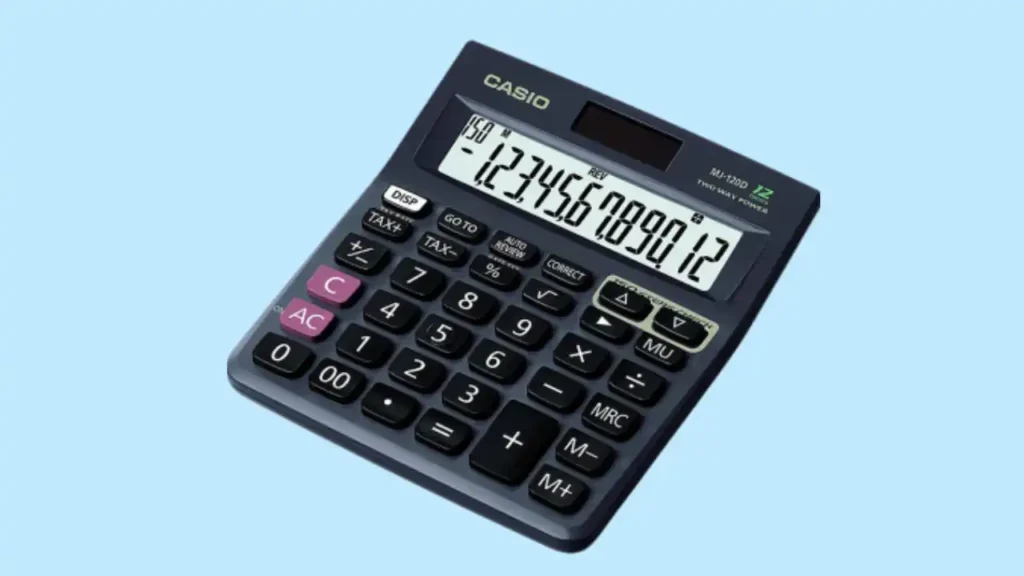
Living in Bristol, I have seen my fair share of grey skies and rainy afternoons. My trusty desk companion often struggles when the clouds roll in over the Clifton Suspension Bridge. If your casio two way power calculator not working is causing a bit of a headache, you are certainly not alone. It is a very common issue I hear about from students and office mates alike. Usually, the fix is much simpler than buying a brand-new one. I have tinkered with these for years, so let me share how to get yours back in action.
What “Two Way Power” Actually Means
Many people assume “two way power” means the calculator will never die. Not quite. It simply means it uses both a small solar panel and a backup battery. In Britain’s grey winters, that distinction matters. The solar strip handles the heavy lifting in bright rooms, while the tiny coin cell keeps things steady when the sun hides.
How Dual Power Works
- Solar cell: This strip converts light into energy to run the display.
- Internal battery: This provides a steady voltage during low-light use.
- Automatic switching: The device picks the best power source on the fly.
Popular UK Models Using Two Way Power
- Casio fx-83GTX: The classic secondary school staple.
- Casio fx-85GTX: The solar-boosted version of the 83.
- Casio MS-20UC: A colourful choice for shop counters and desks.

Why Your Casio Two Way Power Calculator Is Not Working
It often happens on a Sunday night before school or during a busy work shift. You press ON. Nothing. No flicker. No faint display. There are usually only a handful of causes. In my experience, it is rarely a “broken” brain and almost always a power delivery snag.
Flat or Failing Battery
- Drained cell: Even “solar” models have a battery that eventually dies.
- Old age: If you have used it since Year 7, the battery is likely spent.
- Corrosion: Cheap batteries can leak over time, ruining the metal tabs.
Insufficient Light (UK Winter Factor)
- Dull days: Solar cells need a decent amount of lumens to wake up.
- Overcast sky: Our British weather often fails to trigger the solar panel.
- LED bulbs: Some modern energy-saving bulbs don’t emit the right light spectrum.
Dirty or Blocked Solar Panel
- Dust: A layer of grime acts like a curtain over the panel.
- Grease: Fingerprints can smudge the glass and block light.
- Scratches: Heavy damage can stop the panel from catching rays.
Quick Diagnostic Table – Battery or Solar Problem?
After years of seeing student calculators brought in before GCSE exams, patterns are clear. Most “dead” dual power calculators aren’t broken, they’re underpowered. This table helps narrow it down quickly based on what I see in my workshop.
| Symptom | Likely Cause | Easy DIY Fix? | Urgency |
| Works in sunlight only | Flat internal battery | Yes | Low |
| No display at all | Battery dead or contact issue | Yes | Medium |
| Flickering screen | Weak battery voltage | Yes | Low |
| Completely unresponsive | Internal circuit fault | Maybe not | High |
Step-by-Step: How to Fix It at Home
Before assuming it’s ruined, try these steps calmly. Most fixes take less than 15 minutes and cost under £5. I always start with the easiest check first to save a trip to the shops.
Step 1: Test Under Bright Natural Light
- Place the unit near a window in direct daylight.
- Avoid cloudy, indirect light if possible.
- Wait 30–60 seconds for the circuit to “prime” itself.
Step 2: Replace the Battery
- Find the correct coin cell (usually a LR44 or CR2032).
- Remove the small screws on the back plate carefully.
- Use a dry cloth to clean the metal contacts before putting the new cell in.
Last Step: Perform a Reset
- Look for a tiny hole on the back marked “RESET.”
- Use a paperclip to press the button inside for three seconds.
- This clears the “logic freeze” that often happens during a low-power state.
The UK Climate Effect on Solar Calculators
Dual power works brilliantly in bright countries. In the UK? Less so in November. Solar cells struggle in dull daylight. I’ve noticed that devices stored in dark rucksacks all winter are the first to fail.
Why British Winters Matter
- Low intensity: The sun sits lower and provides less “punch” for the panel.
- Indoor life: We spend more time under dim lamps than in the sun.
- Battery drain: Without solar help, the tiny battery works much harder.
Preventative Habits
- Change cells early: Swap the battery every 2–3 years to be safe.
- Bright storage: Keep it on a desk, not tucked away in a dark drawer.
- Dry spots: Avoid leaving it in a cold car where damp can get inside.
Expert Insight on Dual Power Failures
Solar calculators are simple devices, but misunderstanding how they switch power causes confusion. Many people throw away perfectly good tools because they think the “solar” part has “burnt out.”
Expert Advice: “In over 80% of dual power calculator failures, the solar panel is fine. It’s the small backup battery that quietly dies.” — Dr. Alan Whitmore, Electronics Engineer.
Why Casio Dual Power Is Generally Reliable
- Efficient chips: They use very little current to do maths.
- Durable build: Casio uses high-grade glass for their solar strips.
- Smart design: The two sources work in tandem to protect your data.
When It’s Not Worth Repairing
Sometimes the maths doesn’t add up. If repair costs exceed replacement, practicality wins. I love fixing things, but I also know when to call it a day.
Signs Replacement Is Better
- Corroded PCB: If you see green “fuzz” on the green board inside.
- Component failure: If a chip has physically popped or burnt.
- Cracked panel: A shattered solar strip is very hard to find a part for.
Cost Comparison in the UK
- New scientific calculator: Usually costs between £10 and £20.
- Pro repair: Labour costs at a shop will be at least £25.
- Verdict: Only pay for pro repair if the model is rare or vintage.
How to Extend the Life of a Two Way Power Calculator
These calculators can last 10+ years if treated well. The key is simple maintenance, nothing dramatic. I have a Casio from the 90s that still works because I follow these simple rules.
Annual Maintenance Checklist
- Battery check: Open the hatch and ensure no leaks are starting.
- Clean the strip: Wipe the solar panel with a soft, dry cloth.
- Tighten screws: Give the back screws a tiny turn to keep the seal tight.
Daily Use Habits
- Don’t cover the strip: Keep your fingers clear of the solar window.
- Dry hands: Moisture from hands can seep into the button gaps.
- Flat storage: Storing under heavy books can flex the screen and break seals.
Common Myths About Solar Calculators
There’s a surprising amount of misinformation about “solar-powered” devices. Let’s clear the air so you know what you are actually dealing with.
- Myth 1 – Solar Means No Battery: This is false. Almost all “Two Way” models need a battery to function in a normal room.
- Myth 2 – It’s Broken if it Dies in the Dark: Not at all. It just means your battery is flat and the solar panel has no light to help.
- Myth 3 – Panels Wear Out: Solar cells don’t really “wear out” like a battery does. They can last decades if they don’t get smashed.
Most Are Simple Fixes
In most UK households and classrooms, the solution is refreshingly simple: change the battery. Solar rarely fails. The backup power does. Do not give up on your Casio just yet. A five-minute fix usually solves the problem.
Final Recommendation
I hope this helps you fix your casio two way power calculator not working today. It is quite a nice feeling to save a bit of tech from the bin. Just stay calm and try a fresh battery first. Most of the time, that is all it needs to spark back to life. These little tools are very sturdy and want to work for you.
FAQs
If your Casio two way power calculator is not working, the battery may be low. The solar panel may also lack light. Try both power sources.
A blank screen often means no power. Place it under bright light. If it still fails, replace the battery.
First, press the reset button on the back. Then test it in strong light. If needed, change the battery and try again.
Yes. Even with solar power, a weak battery can stop it. Replacing the battery often solves the problem.
The solar panel can lose strength with age. Dirt can also block light. Clean the panel and test in bright light.
Use a small pin to press the reset hole. This can fix small errors. After reset, check if it powers on.
If battery and reset do not help, it may be worn out. Check repair cost and compare with a new model.

Co-Founder, Owner, and CEO of MaxCalculatorPro.
Ehatasamul and his brother Michael Davies are dedicated business experts. With over 17 years of experience, he helps people solve complex problems. He began his career as a financial analyst. He learned the value of quick, accurate calculations.
Ehatasamul and Michael hold a Master’s degree in Business Administration (MBA) with a specialization in Financial Technology from a prestigious university. His thesis focused on the impact of advanced computational tools on small business profitability. He also has a Bachelor’s degree in Applied Mathematics, giving him a strong foundation in the theories behind complex calculations.
Ehatasamul and Michael’s career is marked by significant roles. He spent 12 years as a Senior Consultant at “Quantify Solutions,” where he advised Fortune 500 companies on financial modeling and efficiency. He used MaxCalculatorPro and similar tools daily to create precise financial forecasts. Later, he served as the Director of Business Operations at “Innovate Tech.” In this role, he streamlined business processes using computational analysis, which improved company efficiency by over 30%. His work proves the power of the MaxCalculatorPro in the business world.
Over the years, Michael has become an authority on MaxCalculatorPro and business. He understands how technology can drive growth. His work focuses on making smart tools easy to use. Michael believes everyone should have access to great calculators. He writes guides that are simple to read. His goal is to share his knowledge with everyone. His advice is always practical and easy to follow.