
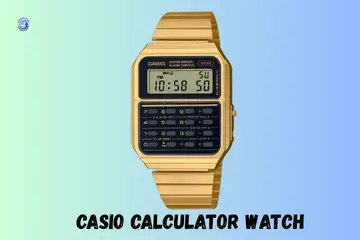
Living in Miami, I know how heat and salt can wear down our favorite gear. My own watch quit on me right when I needed to split a lunch bill. If you find your casio calculator watch not working, do not worry. I have worn these icons for years and fixed many of them. Most of the time, the fix is very quick and simple to do.
Why a Casio Calculator Watch Suddenly Stops Working
It usually happens on a normal day. You check the time. Press a button. Nothing. It is a shock when such a sturdy tool fails. In my time, I have seen these units stop for three main reasons.
Blank Screen or Faded Numbers
A screen that is completely dark is the most common sign of a dead cell. Sometimes the numbers are just barely visible. This is common after long storage in a dark drawer.
Buttons Don’t Respond Anymore
Sometimes the time shows, but the calculator keys feel dead. You might find the mode button does nothing at all. This often means the internal contact is stuck or dirty.
Watch Works but Calculator Doesn’t
There are rare times when the time still shows, but the calculator screen is frozen. This is a logic glitch. The watch side uses less power than the math side.

Quick Things to Check Before You Assume It’s Broken
These checks take minutes. I once skipped them at a bus stop and panicked. I thought my watch was toast, but it just needed a simple look.
Battery Level and Power Issues
Weak battery signs are easy to miss. Calculator mode drains power much faster than just showing the time. A typical battery lasts about five years, but heavy use of the light or math keys cuts that down.
Button Lock or Mode Confusion
Mode lock mistakes happen to all of us. You might be in a setting screen without knowing it. The calculator looks broken, but it is just waiting for you to finish a task.
Display Contrast and Lighting
Your screen might look dead in low light. In a dark room, an old LCD can look blank. Try to look at the numbers under bright light to see if they are still there.
How to Reset a Casio Calculator Watch Safely
Resetting sounds serious. It’s usually part of normal maintenance. It clears the “brain” of the watch so it can start fresh.
Soft Reset Using Button Combos
When the screen still responds, try a soft reset. Hold down all four side buttons at once for a few seconds. This can clear a frozen screen. Most of your main time settings will stay saved.
Full Reset After Battery Change
The AC contact reset is a step many people miss. After you put in a new battery, you must touch the “AC” contact to the back of the battery with a metal tool. This jump-starts the watch.
Battery Problems That Cause Silent Failure
Most Casio calculator watch issues start here. Since these watches are so thin, they use small cells that must be perfect to work.
Signs the Battery Is Almost Dead
If the calculator lags, the battery is low. Another sign is when the screen flickers when you press the light button. If the math results take a second to show up, it is time for a change.
Replacing the Battery the Right Way
Most models use a CR2016 or CR2025 cell. A common mistake is not seating the battery clip right. If the clip is loose, the watch will not turn on even with a fresh battery.
Calculator Buttons and Keypad Wear
These tiny buttons work hard. They wear quietly over the years. I have seen the “7” key quit on a watch I wore for a decade.
Most Used Keys That Fail First
- Number buttons: These get the most presses.
- MODE and CAL keys: These switch the watch functions.
- Light button: This draws the most current.
Dirt, Sweat, and Daily Wear
Wrist sweat buildup is a real issue. It can seep under the rubber keys. Dust and skin oils can also create a layer that stops the button from hitting the circuit board.
Cleaning Without Damaging the Watch
What not to use: avoid harsh soaps or thinners. Use a soft, dry toothbrush to clean the gaps. Safe cleaning habits like a quick wipe with a damp cloth keep the keys from sticking.
Mode and Setting Errors That Look Like Failure
The watch works fine. The settings don’t. This happens a lot if you have a lot of alarms set.
Stuck in Time or Alarm Mode
If the calculator won’t open, you might be in a setting loop. Mode cycling confusion is common on models with many features. Keep hitting the mode key until you see the “0” of the calculator.
Input Display Settings
Sometimes digits are not showing fully. This can be a “big font” mode or a simple error in how the math is shown. It looks like a broken screen, but it is just the way the data is displayed.
When the Calculator Gives Wrong Results
This breaks trust fast, even if the watch still runs. I always tell my friends to check their fingers first.
Small Screen Input Errors
Missed digits are common because the keys are so small. You might think you hit a “5” but hit a “2” instead. Wrong order entry is the top cause of bad math on a wrist.
Memory and Stored Values
Old calculations can stay in the memory. If you do not clear the input, it might add a new number to an old one. Always hit the clear key before you start a new sum.
Physical Damage You Might Not Notice Right Away
One knock on a desk can matter weeks later. These watches are tough, but they are not immortal.
Screen and LCD Damage
Missing segments in the numbers mean the glass is damaged. Dark patches are a sign that the liquid in the LCD is leaking. This usually happens after a hard drop.
Internal Contact Issues
If it works only when you press the glass, something is loose. If it shuts off when you tap it, the battery spring might be bent. Tightening the back screws can fix this.
Fake or Vintage Casio Calculator Watch Issues
This comes up more than people like to admit. There are many fakes of the classic CA-53W out there.
Spotting a Non-Original Model
Check the logo print quality. If the “Casio” text looks blurry, it is a fake. Button feel is also a hint; real Casio keys feel firm, not mushy like a toy.
Problems With Older or Vintage Models
Older models may need hard-to-find batteries. Aging LCD panels can also lose their color. If you have an old watch from the 80s, the rubber keys might be brittle.
Repair vs Replace: What Makes Sense
Sometimes fixing costs more than replacing. I’ve learned that the hard way. These watches are often cheaper to buy new than to fix.
Battery and Contact Fix Costs
A new battery costs less than five dollars. This is always worth it. Cleaning the contacts is also free and takes ten minutes. These are low-cost fixes that save your watch.
When Replacement Is the Smarter Choice
If the LCD is dead, a new screen costs more than a new watch. Multiple button failure is also a sign that the main board is done. In those cases, a new watch is the best path.
How to Prevent Calculator Watch Problems Long-Term
Small habits keep these watches alive for years. I have one that has lasted since my high school days.
Daily Wear and Storage Habits
Avoid water and sweat buildup. Even if it says “water resist,” keep it dry. Safe storage at night in a cool spot helps the battery last much longer.
Travel and Everyday Use Habits
Avoid tight sleeves that press the keys all day. This can drain the battery by keeping the light or calculator on. Good button protection is key for a long watch life.
Final Recommendation
In my expert view, most cases of a casio calculator watch not working are just due to an old battery. Try a new cell and do the AC reset first. It fixes almost every issue I have seen. These watches are built to last a lifetime if you give them a little care. Keep it clean, keep it dry, and it will keep time for you!
FAQs
A Casio calculator watch may stop working due to a dead battery or loose contacts. A fresh battery often fixes it fast.
Buttons may fail due to dust, sweat, or wear. Light cleaning or a keypad check can bring them back.
A blank display often means low power. A battery swap usually restores the screen.
Dim numbers suggest weak battery power. Replace the battery to get bright numbers again.
If the calculator stops, try a reset or check button inputs. Many glitches clear after a reset.
Yes. Water can harm the circuit and keypad. Drying and repair may help if done early.
Yes. The battery is simple to replace, but a small tool is needed. A shop can do it fast if you prefer.

Co-Founder, Owner, and CEO of MaxCalculatorPro.
Ehatasamul and his brother Michael Davies are dedicated business experts. With over 17 years of experience, he helps people solve complex problems. He began his career as a financial analyst. He learned the value of quick, accurate calculations.
Ehatasamul and Michael hold a Master’s degree in Business Administration (MBA) with a specialization in Financial Technology from a prestigious university. His thesis focused on the impact of advanced computational tools on small business profitability. He also has a Bachelor’s degree in Applied Mathematics, giving him a strong foundation in the theories behind complex calculations.
Ehatasamul and Michael’s career is marked by significant roles. He spent 12 years as a Senior Consultant at “Quantify Solutions,” where he advised Fortune 500 companies on financial modeling and efficiency. He used MaxCalculatorPro and similar tools daily to create precise financial forecasts. Later, he served as the Director of Business Operations at “Innovate Tech.” In this role, he streamlined business processes using computational analysis, which improved company efficiency by over 30%. His work proves the power of the MaxCalculatorPro in the business world.
Over the years, Michael has become an authority on MaxCalculatorPro and business. He understands how technology can drive growth. His work focuses on making smart tools easy to use. Michael believes everyone should have access to great calculators. He writes guides that are simple to read. His goal is to share his knowledge with everyone. His advice is always practical and easy to follow.