
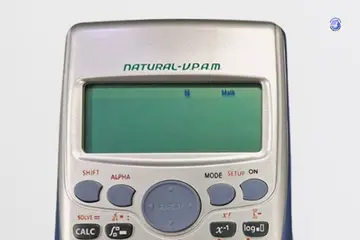
Helping a student in Denver fix their math gear last week reminded me of my own study scares. It is quite a shock when your screen goes dark before a big test. If you find your casio calculator display not working, stay calm and follow my lead. I have worked with these models for years and know their quirks well. Most of the time, the fix is much faster than you think.
When the Casio Calculator Screen Suddenly Goes Blank
It usually happens during late-night homework or right before an exam. You look down, and the display is just… gone.
What “display not working” really means
- Screen is completely blank: No numbers show up even when you press ON.
- Numbers appear very faint: You have to tilt the unit to see any digits.
- Display flickers on and off: The screen blinks or fades as you type.
- Partial digits: Only some lines show up, making the math hard to read.
Why this issue feels worse than a dead calculator
The buttons still work, so it is very confusing for the user. It makes you second-guess every press you make. This problem always seems to show up at the worst possible time.

Quick Checks That Fix Many Casio Display Problems
Before assuming it’s broken, a few quick checks often bring the screen back to life.
Adjust the display contrast
Many Casio calculators have hidden contrast controls. The screen can look “off” when it is just set too light. Try to press SHIFT, then MODE, and find the “CONT” option. Use the arrows to darken the view.
Check the battery condition
Weak batteries dim the LCD first. The screen often fades away before the whole calculator shuts off. Replace your old cell with a fresh, brand-name battery to see if the glow returns.
Test solar power exposure (dual-power models)
Indoor light may not be enough for some solar strips. Place the unit under direct sunlight or a very bright lamp. Wait about 60 seconds and then check the display again.
Display Issues Caused by Software or Internal Glitches
Sometimes the screen isn’t broken, it’s just confused by a small system bug.
Temporary system freeze
A freeze can happen after very long use. The calculator is actually on, but the screen won’t refresh the numbers. It looks dead, but the “brain” is just stuck in a loop.
Performing a safe reset
Start by removing the battery for a moment. Hold down the AC or ON key for ten seconds to drain the power. Reinsert the battery and see if the display wakes up.
Using the reset pinhole (if present)
This is common on scientific Casio models like the fx-991 series. Use a small paperclip to press the hole on the back gently. One quick press is usually enough to reboot the system.
Physical Reasons the Casio Display Stops Working
This is where things get a bit more real, and sometimes a bit painful for your wallet.
Pressure damage from bags or books
Heavy textbooks can press against the LCD in your bag. This pressure damage may appear slowly over time. It often starts as faint lines or small dark spots on the screen.
Drops and small impacts
Even short drops from a desk can affect the display. The calculator may still turn on, but the LCD connection becomes loose. This leads to a screen that stays blank or shows garbled data.
Moisture and humidity exposure
Sweat, rain, or damp rooms are bad for electronics. The LCD layers react poorly to moisture. This can cause the display to fade or partially disappear in patches.
Casio Model-Specific Display Problems
Not all Casio calculators fail the same way. Each series has its own known issues.
Scientific calculators (fx-991, fx-570 series)
Contrast issues are very common in these scientific units. Dual power also causes confusion when the cell is weak. Display problems here often look much worse than they really are.
Graphing calculators
Battery drain in graphing models often mimics a screen failure. Software lockups can also affect the display output. These units use a different reset sequence that you should check in your manual.
Older Casio models
LCD aging happens over time with older tech. You might see a slower response in cold weather. These screen issues tend to appear gradually over many months.
When the Display Is Faint but Not Completely Dead
If you have to tilt the calculator to read it, this section matters most to you.
Contrast vs battery confusion
Low power makes the contrast adjustment less effective. Adjusting the contrast alone won’t help if the voltage is low. A simple battery replacement usually fixes this issue right away.
Viewing angle limitations
LCDs rely on the right angle and light to be seen. The screen may seem to vanish at certain angles in a dark room. This is normal behavior, but it can be very frustrating.
Early signs of LCD failure
Look for uneven brightness across the screen. You might see “ghosting” where old numbers stay visible. A slow refresh when you are typing fast is also a sign of a dying display.
Can You Fix a Broken Casio Display at Home?
Short answer: sometimes. Long answer: it depends on what is actually wrong with the hardware.
What’s safe to try
- Battery replacement: This is the best first step.
- Reset procedures: Using the pinhole or button combos.
- Contrast adjustments: Setting the light level via the menu.
What usually isn’t worth attempting
Opening the calculator casing is risky. DIY screen repairs often lead to more damage. Most users should avoid trying to replace the LCD on their own.
Repair vs replacement decision
Repairs often cost more than buying a new unit. Casio calculators are built to be replaced if the board fails. Replacement is the standard choice for most students and pros.
How to Prevent Display Problems in the Future
A few small habits can save your screen, and your nerves, during exam season.
Storage and transport habits
Always use a hard case or a protective pouch. Keep the unit separate from your heavy books. Avoid tight backpack pockets that put pressure on the glass.
Battery and power care
Replace your batteries early before they leak. Remove the battery if you store the unit for a long time. Do not rely only on solar power if the room is dim.
Everyday handling
Avoid pressing hard on the screen with your fingers. Keep the unit away from moisture and spills. Clean the screen gently with a soft cloth, never with harsh liquids.
Final Recommendation
In my expert view, most cases of a casio calculator display not working are just a matter of low power or wrong contrast. My advice is to swap the battery first. It is the most common fix I see in the field. If that fails, try a full reset using the pinhole on the back. Take care of your Casio, and it will keep your math clear for years!
FAQs
A dead or weak battery is the most common cause. Replacing the battery often brings the display back.
A blank display can mean low power or loose contacts. A reset or battery change may help.
Dim lines show low battery power. Swap the battery to restore bright digits.
Missing segments point to screen ribbon issues or wear. Light pressure tests can confirm the fault.
Flicker can come from weak battery power. A fresh battery usually makes the display stable again.
Yes. Heat can warp LCD parts and darken the screen. Let it cool and test again.
Some screens can be repaired, but parts may cost more than a new calculator. Many users choose replacement.

Co-Founder, Owner, and CEO of MaxCalculatorPro.
Ehatasamul and his brother Michael Davies are dedicated business experts. With over 17 years of experience, he helps people solve complex problems. He began his career as a financial analyst. He learned the value of quick, accurate calculations.
Ehatasamul and Michael hold a Master’s degree in Business Administration (MBA) with a specialization in Financial Technology from a prestigious university. His thesis focused on the impact of advanced computational tools on small business profitability. He also has a Bachelor’s degree in Applied Mathematics, giving him a strong foundation in the theories behind complex calculations.
Ehatasamul and Michael’s career is marked by significant roles. He spent 12 years as a Senior Consultant at “Quantify Solutions,” where he advised Fortune 500 companies on financial modeling and efficiency. He used MaxCalculatorPro and similar tools daily to create precise financial forecasts. Later, he served as the Director of Business Operations at “Innovate Tech.” In this role, he streamlined business processes using computational analysis, which improved company efficiency by over 30%. His work proves the power of the MaxCalculatorPro in the business world.
Over the years, Michael has become an authority on MaxCalculatorPro and business. He understands how technology can drive growth. His work focuses on making smart tools easy to use. Michael believes everyone should have access to great calculators. He writes guides that are simple to read. His goal is to share his knowledge with everyone. His advice is always practical and easy to follow.