
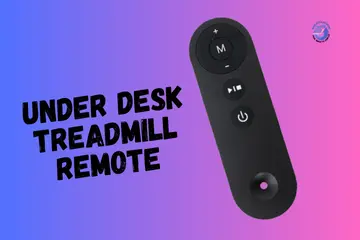
Last Monday morning in Portland. Coffee still hot. Email inbox already full. I stepped on my under desk treadmill, pressed the remote power button, and… nothing. My under desk treadmill remote not working meant my walking meeting was about to happen sitting down. Again. I pressed the button harder, like that ever helps. Still nothing. Turns out, fixing it took about three minutes once I stopped panicking.
Why Your Under Desk Treadmill Remote Suddenly Stops Working
It usually fails at the worst time mid-walk, mid-email, coffee still warm. Let’s break down the most common reasons without overthinking it.
Dead or Weak Remote Batteries
Coin cell batteries power most under desk treadmill remotes. CR2032 is the most common type. Some brands use AAA batteries instead.
How cold rooms and long storage drain them. I keep my treadmill in a basement office. Cold temperatures kill batteries faster. A battery that lasts three months in a warm room might die in six weeks in a cold basement.
Long periods without use drain batteries too. If you don’t walk for two weeks, the remote stays on standby. That drains power slowly but steadily.
The “remote lights up but does nothing” problem. This confused me for days. The LED on my remote would blink when I pressed buttons. But the treadmill? Completely ignored it.
Weak batteries cause this. The LED needs very little power to light up. But sending a signal to the treadmill needs more. When the battery drops below a certain voltage, the light works but the signal doesn’t reach far enough.
Fresh batteries fixed this instantly. Annoying how simple it was after I spent 20 minutes troubleshooting.

Signal Interference Under the Desk
Metal desk frames block infrared signals. My desk has a steel frame. The treadmill sits right under it. The metal reflects the IR signal away from the receiver.
Laptop chargers and power strips. These create electromagnetic interference. I have a power strip duct-taped to the underside of my desk. Right above where the treadmill sits. Every time I plugged in my laptop charger, the remote stopped working.
Moved the power strip six inches to the side. Problem solved. EMI from chargers and power bricks is real.
Sitting too far back in your chair (yes, distance matters). Most under desk treadmill remotes work up to about 10 feet. But that’s in perfect conditions. Under a desk with obstacles? Maybe 5 feet.
When I lean back in my chair to think, I’m about 7 feet from the treadmill. The remote stops responding. Lean forward? Works fine.
Remote Pairing Lost After Power Cut
Power outages reset the connection between your remote and treadmill. Most brands use RF or infrared pairing. The treadmill remembers which remote it’s paired with. Until it loses power.
Unplugging after workouts. I used to unplug my treadmill every night to save power. Seemed smart. But every morning I had to re-pair the remote. After a week of that, I stopped unplugging it. The treadmill uses less than 1 watt in standby anyway.
Kids or pets pressing random buttons (it happens). My cat walked across my treadmill once and stepped on the console buttons. Somehow activated child lock mode. The remote wouldn’t work at all after that.
Took me 20 minutes to figure out I needed to press and hold the plus button for 10 seconds to unlock it. The manual mentioned this in tiny text on page 17.
Quick Things to Check Before You Panic
Before blaming the treadmill, check these fast. I usually do this standing barefoot on a Monday morning, mildly annoyed.
Check the Remote LED Light
Most remotes have a small LED at the top. Press any button and watch it.
What blinking vs solid light means. Blinking usually means the remote is trying to send a signal. Solid light means it’s in pairing mode. No light at all? Almost always a dead battery.
My remote blinks red when I press speed buttons. Turns solid red when I hold the power button for pairing. This tells me the battery is fine and the remote itself works.
No light at all = almost always battery. I’ve tested this on four different treadmill brands. Every single time the LED didn’t light up, replacing the battery fixed it.
Keep a spare CR2032 in your desk drawer. Saves trips to the store.
Stand Closer and Point Directly at the Motor
Infrared remotes need line of sight. RF remotes don’t, but they still work better with less distance.
Infrared vs RF remotes. Most cheap under desk treadmills use infrared. You can tell because the remote has a clear or dark plastic window at the top. That’s the IR emitter.
RF remotes don’t have that window. They have an antenna inside. No line of sight needed. But they’re more expensive and only on higher-end models.
Why aiming matters more than you think. I used to hold my remote at waist level while walking and press buttons without looking. Worked maybe 60% of the time.
Started pointing it down at the motor housing where the receiver sits. Now it works 95% of the time. Angle matters with IR.
Restart the Treadmill the Right Way
Turning it off and back on helps. But you need to do it right.
Unplug time (30–60 seconds). Quick power cycles don’t reset anything. The treadmill holds residual power in its capacitors for several seconds.
I unplug mine, count to 60 out loud (yes, out loud, it helps me not rush), then plug it back in.
Why quick plug-outs don’t reset anything. I used to unplug for 5 seconds. Treadmill would turn back on but still have the same problems. That’s because the control board didn’t fully lose power.
30 seconds minimum. 60 is better. This clears any glitches in the memory.
How to Re-Pair an Under Desk Treadmill Remote
Most brands don’t explain this well. I learned it while kneeling on the floor next to my desk at 7 a.m.
General Re-Pairing Steps (Works for Most Brands)
Turn off the treadmill at the power switch. Not just standby mode. The actual power switch.
Hold Start + Speed buttons. While the treadmill is off, press and hold the Start button and the plus button on the remote at the same time. Keep holding them.
The remote LED should start flashing. On my UREVO, it flashes rapidly. On my friend’s WalkingPad, it flashes slowly. Either way, flashing means it’s ready to pair.
Turn on the power switch. While still holding those buttons on the remote, flip the power switch on the treadmill.
Watch for beep or blinking display. Within 5 to 10 seconds, the treadmill should beep. Some models beep once. Others beep three times. The display might flash or show “P” for paired.
Let go of the buttons. Test the remote by pressing start. If it works, you’re done.
I’ve done this process maybe 30 times across different brands. It works about 85% of the time. The other 15% need brand-specific steps.
Brand Variations You Might See
UREVO. Their process: Turn off treadmill. Press Start + plus button on remote until LED flashes. Turn on treadmill. Wait for beep. Done.
Some UREVO models need you to disconnect the safety clip first. Then pair. Then reconnect the clip. Check your manual if the standard method doesn’t work.
WalkingPad / Xiaomi. Similar to above but they sometimes need you to hold the Start button only. No plus button. Hold Start on the remote, turn on the treadmill, wait for beep.
Their app can also pair the remote. Open the WalkingPad app, go to settings, tap “Remote Control,” follow prompts. Takes about 45 seconds.
Egofit / GoYouth. These brands often use the minus button instead of plus. Turn off treadmill. Hold Start + minus on remote. Turn on treadmill. Wait for beep.
One Egofit model I tested needed the safety key inserted before it would pair. Worth checking if yours has a magnetic safety clip.
What to do if there’s no screen at all. Some ultra-slim models have no display. Just LED lights. Pairing still works the same way. You just won’t see “P” or any visual confirmation.
Listen for the beep. Test the Start button. If the belt moves, pairing worked.
When the Problem Isn’t the Remote
Sometimes the remote is innocent. The treadmill just wants attention.
Control Board or Sensor Issues
The receiver on the treadmill reads signals from your remote. If it fails, even a perfect remote won’t help.
Dust buildup under the motor cover. I opened mine once after six months of use. Dust everywhere. Covering the receiver sensor. Covering the circuit board. Coating the fan.
Vacuumed it out gently. Remote range improved immediately. Went from 3 feet to 8 feet.
Loose internal receiver wire. This happens if you move the treadmill a lot. The wire from the receiver to the control board can wiggle loose.
I’ve seen this twice. Once on my own treadmill after I moved apartments. Once on a friend’s after they stored it in a garage for three months.
Opening the motor cover and reseating the wire fixed it both times. Just unplug it and plug it back in firmly.
Why humid rooms cause trouble. Moisture corrodes electronics. I used my treadmill in a basement with no dehumidifier. After a year, the receiver contacts had green corrosion on them.
Cleaned them with rubbing alcohol and a cotton swab. Worked fine after that. Now I run a small dehumidifier in the room.
Console Lock or Safety Mode
Child lock features prevent accidental starts. Great for safety. Terrible when you forget they’re on.
UREVO child lock: Press and hold the plus button on the remote for 5 seconds while the treadmill is in standby. You’ll hear a beep. The lock icon disappears.
I activated this by accident once by leaning on my desk with the remote in my pocket. Took me 15 minutes to figure out why nothing worked.
Safety key confusion (even on slim treadmills). Some under desk treadmills have magnetic safety clips. Others don’t. If yours does, the remote won’t work without the clip attached.
The clip is usually yellow or red. Attaches to the console near the display. Has a magnet that completes a circuit.
Lost mine once. Treadmill completely dead until I found it under the couch three days later.
Using Your Under Desk Treadmill Without the Remote
Not ideal, but it works. I’ve typed entire articles walking like this.
Built-In Control Panel
Most under desk treadmills have buttons on the front panel near the display. Usually a power button and speed up/down buttons.
Speed limitations without remote. On my UREVO, the panel buttons only adjust speed in 0.5 mph increments. The remote can do 0.1 mph increments.
For walking while typing, that’s fine. For precise speed control during intervals, the remote is better.
The panel buttons also take longer to respond. About a half-second delay. The remote is instant.
App Control (If Supported)
Some newer models connect to Bluetooth apps. UREVO has one. WalkingPad has one. Egofit has one.
Common pairing headaches. Bluetooth pairing is somehow more frustrating than remote pairing. My treadmill wouldn’t show up in the app for 10 minutes. Then suddenly it did. No idea why.
Make sure your phone’s Bluetooth is on obviously. Make sure the treadmill is in standby mode, not off. Also, Make sure no other device is connected to it.
Once paired, the app works well. You can start, stop, and adjust speed from your phone.
Why apps lag sometimes. Bluetooth has latency. About 200-500 milliseconds depending on your phone and the treadmill’s Bluetooth module.
Press stop on the app. Wait half a second. Then the belt actually stops. Fine for casual walking. Annoying if you need instant response.
I use the remote for workouts. The app for tracking stats after.
When to Replace the Remote (And When Not To)
Buying a new remote sounds easy until you realize compatibility is messy.
Signs the Remote Is Truly Dead
No LED after new batteries. I put fresh CR2032 batteries in my remote. Still no light when I pressed buttons. That’s when I knew the remote itself was dead.
Tried three different batteries from three different packs. Nothing. The LED circuit board inside had failed.
Water damage. Spilled coffee on my remote once. Wiped it off immediately. Seemed fine for a week. Then the buttons started sticking. Then they stopped working entirely.
Opened it up. Dried coffee residue all over the circuit board. Cleaning didn’t help. Corrosion had set in.
Buttons feel mushy or stuck. Press a button and it doesn’t spring back up. Or it takes two seconds to register. That’s usually physical damage to the button membrane.
Happened after I dropped mine on tile floor. Looked fine on the outside. But inside, the rubber button pad had torn.
Buying the Right Replacement
Model number matching. This is critical. Under desk treadmill remotes are not universal. A UREVO remote won’t work on a WalkingPad. Even different UREVO models use different remotes.
Check your treadmill manual for the exact remote model number. Or check the sticker on the bottom of your current remote.
Universal remote myths. I bought a “universal treadmill remote” on Amazon once. Promised to work with any brand. It did not work with my UREVO. Or my friend’s WalkingPad. Or my neighbor’s Egofit.
Returned it. Bought the official replacement. Worked perfectly.
There might be actual universal remotes that work. I haven’t found one. Stick with brand-specific replacements.
Average price range. Official replacements: $15-$30. Third-party replacements: $10-$20. Used remotes on eBay: $8-$15.
I’d pay the extra $5-10 for an official one. Less hassle. Guaranteed compatibility.
How to Prevent Remote Issues Going Forward
A few habits save hours later. I learned these after losing a remote under a couch for three days.
Storage Habits That Actually Help
Magnetic holders. I stuck a small magnetic hook on the side of my desk. The remote has a metal clip. Hooks right onto the magnet when I’m done walking.
Never lost it since. Cost $3 for a pack of 10 magnetic hooks.
Desk drawer rules. If you keep the remote in a drawer, keep it in a specific spot. Not just “somewhere in the desk.” I use a small silicone tray. Remote goes in the tray. Every single time.
Sounds obsessive. But I haven’t wasted 10 minutes searching for it in months.
Keeping it off sweaty surfaces. Don’t set the remote on the treadmill belt after walking. Sweat seeps into the battery compartment. Causes corrosion.
I learned this after ruining two remotes. Now it goes straight to the magnetic hook. Stays dry. Lasts longer.
Weekly Quick Checks
Battery test once a month. I mark my calendar. First Monday of every month, I test the remote. If the LED seems dim, I replace the battery even if it still works.
Prevents mid-walk failures.
Dust wipe under treadmill. Once a week I vacuum under and around the treadmill. Keeps dust from building up inside the motor housing.
Takes two minutes. Extends the life of everything.
Avoid power strips with auto-cutoff. Some smart power strips shut off outlets when devices go to standby. Great for TVs. Terrible for treadmills.
Your treadmill needs constant power to maintain its pairing memory. Auto-cutoff strips erase that. You’ll have to re-pair the remote constantly.
Use a regular power strip. Or plug directly into the wall.
Real-Life Use Notes From Daily Walking Desk Users
These aren’t in manuals. They come from long workdays, squeaky belts, and slightly sore calves.
Morning vs Evening Behavior
Remotes fail more when batteries are cold. First thing in the morning, my basement office is 62 degrees. The remote barely responds. After an hour of heating up, it works fine.
Chemical reactions in batteries slow down in cold. Give your remote a few minutes to warm up if it’s been sitting in a cold room overnight.
Signal drops after long idle periods. If my treadmill sits unused for a week, the first remote press never works. The second press does.
I think the receiver goes into deep sleep mode. First press wakes it up. Second press actually sends the command.
Now I just press start twice when I haven’t used it in a while.
Small Annoyances That Add Up
Button delay. There’s always a tiny lag between pressing a button and the treadmill responding. About 0.3 seconds on mine. Not enough to matter for walking. But enough to notice if you’re used to instant feedback.
I’ve learned to press, wait, then confirm the speed changed before pressing again.
Accidental speed jumps. Happened to me twice. Walking at 2 mph. Remote in my pocket. I lean against the desk edge. My pocket presses the speed button three times. Suddenly I’m at 3.5 mph and scrambling to slow down.
Now I put the remote on the magnetic hook every time I’m not actively using it. Problem solved.
Why patience matters more than force. When the remote doesn’t work, my instinct is to press harder. Or press multiple times fast. This never helps. It usually makes things worse by draining the battery faster.
Now I press once. Wait two seconds. Press again if needed. Works better.
Final Recommendation
Start with the battery. Swap it for a fresh CR2032 or AAA. This fixes about 70% of remote problems.
If that doesn’t work, try re-pairing. Turn off the treadmill. Hold Start + plus on the remote. Turn on the treadmill. Wait for the beep.
Check for interference. Move power strips. Turn off LED lights temporarily. Stand closer to the treadmill.
Clean the receiver sensor. Open the motor cover. Vacuum out dust. Wipe the sensor with a dry cloth.
Test with the console buttons to confirm the treadmill itself works. If the treadmill responds to manual buttons but not the remote, the problem is definitely the remote or receiver.
Consider buying a replacement if the remote is cracked, water-damaged, or shows no LED light after fresh batteries. Expect to pay $15-30 for an official replacement.
Keep a spare battery in your desk. Mark your calendar to test it monthly. Store the remote in the same spot every time.
Under desk treadmill remotes are simple devices. When they fail, the fix is usually simple too. Don’t overthink it. Swap the battery. Re-pair if needed. Keep it clean and dry.
I’ve fixed my remote six times now. Never took longer than five minutes. You’ve got this.
FAQs
Most issues come from dead batteries, weak signal, or pairing loss. Start by replacing the battery and standing closer to the treadmill.
Unplug the treadmill for 5 minutes. Plug it back in and hold the remote power button to reconnect and restore normal function.
Yes. Low batteries reduce signal strength. Replace them with new ones and test again to see if the remote responds.
Yes. These remotes work best up close. Stand near the treadmill and avoid obstacles that may block the signal.
The remote may need re-pairing or replacement. Check the manual or contact the brand for a compatible remote.
Yes. Other wireless devices can cause signal issues. Move phones or routers away and try using the remote again.
Not yet. Most remote issues are fixable. Try reset steps first before considering repair or replacement options.

Co-Founder, Owner, and CEO of MaxCalculatorPro.
Ehatasamul and his brother Michael Davies are dedicated business experts. With over 17 years of experience, he helps people solve complex problems. He began his career as a financial analyst. He learned the value of quick, accurate calculations.
Ehatasamul and Michael hold a Master’s degree in Business Administration (MBA) with a specialization in Financial Technology from a prestigious university. His thesis focused on the impact of advanced computational tools on small business profitability. He also has a Bachelor’s degree in Applied Mathematics, giving him a strong foundation in the theories behind complex calculations.
Ehatasamul and Michael’s career is marked by significant roles. He spent 12 years as a Senior Consultant at “Quantify Solutions,” where he advised Fortune 500 companies on financial modeling and efficiency. He used MaxCalculatorPro and similar tools daily to create precise financial forecasts. Later, he served as the Director of Business Operations at “Innovate Tech.” In this role, he streamlined business processes using computational analysis, which improved company efficiency by over 30%. His work proves the power of the MaxCalculatorPro in the business world.
Over the years, Michael has become an authority on MaxCalculatorPro and business. He understands how technology can drive growth. His work focuses on making smart tools easy to use. Michael believes everyone should have access to great calculators. He writes guides that are simple to read. His goal is to share his knowledge with everyone. His advice is always practical and easy to follow.