
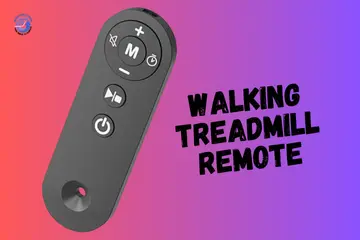
Last Thursday afternoon in Minneapolis, I sat down to answer some emails. Ready to walk while working. I grabbed my walking treadmill remote. Pressed the button. It just stared back at me. My walking treadmill remote not working became an unexpected afternoon project but I figured out what actually fixes these things.
Why Walking Treadmill Remotes Suddenly Stop Working
You’re ready to walk while answering emails. It’s Thursday afternoon. You grab the remote. Press the button. Nothing happens. It just stares back at you.
This happens constantly with compact and under-desk treadmills. I’ve owned my walking pad for nine months now. The remote has stopped working five different times. Always at the worst moment.
Common failure points include dead batteries, lost pairing, and blocked sensors. Nothing complicated. Just annoying when you want to get moving.
Most issues are simple to fix. Batteries die without warning. Pairing gets lost after power outages. Sensors get blocked by invisible dust. I’ve dealt with all of these personally.
Quick safety reminder before we start. Always unplug the treadmill before touching anything inside. Trust me on this. I learned the hard way when I got a tiny shock near my desk. The walking pad was still plugged in. I touched the motor area. Got zapped. Not dangerous but definitely got my full attention. Just unplug it first.

Quick Checks First (The “Okay, Start Here” Stuff)
Start with these simple steps. They’re slightly embarrassing to admit. But they’re also incredibly effective at solving problems.
Check the Batteries (yes… again)
Take out the old batteries. Put in fresh new ones. I know this sounds too obvious. But I’ve stood there frustrated for forty minutes before checking the batteries. They were completely dead.
Use fresh alkaline batteries only. The cheap ones from that random drawer die within days. I keep good quality batteries now specifically for the remote. Worth every extra penny.
Make sure the plus and minus signs match up correctly. The little diagram inside the battery compartment shows exactly which way they go. I’ve put them backwards at least four times. Felt ridiculous every single time.
Clean any corrosion, sweat, or dust from the metal contacts. This builds up invisibly over time if you use the walking pad daily. I wipe mine with a dry cloth weekly now. Sometimes just cleaning those contacts brings a completely dead remote back to life instantly.
Aim at the Receiver Not the Ceiling
The IR receiver window sits in the middle of the LED display. It’s a small dark circle or rectangle. You need a perfectly clear straight line from remote to receiver.
I used to keep papers and notebooks stacked on the console. Blocked the sensor completely. The remote worked perfectly fine. The walking pad just couldn’t see any signal. Moved the papers to my desk drawer. Problem solved immediately.
Keep towels, tablets, and water bottles out of the line of sight too. My tablet sitting on the console blocked the sensor for four days straight before I realized what was happening. The remote seemed broken. It wasn’t. Just couldn’t communicate through the tablet.
Try using it from one to three feet away. Not from across the entire room. These remotes aren’t super powerful devices. I stand about two feet from the display now when pressing buttons. Works perfectly every single time without fail.
Common Remote Problems And What They Actually Mean
Understanding the symptoms keeps frustration levels down. Once I actually knew what was happening, fixing things became way easier.
Remote Lights Up, But Nothing Happens
This frustrated me for almost an entire week. The little LED on my remote blinked clearly with every single button press. So it obviously had power. But the walking pad acted like I didn’t even exist.
The IR sensor was blocked by dust I couldn’t even see with my naked eyes. I wiped the entire display area thoroughly with a microfiber cloth. That fixed it instantly. Sometimes the real problem is completely invisible.
Lost pairing happens frequently after power outages. We had a storm that knocked out power for three hours one evening. When everything came back on hours later, my remote suddenly stopped working. Had to re-pair it completely. Took about twenty seconds once I found the right pairing method.
The console logic can glitch out too. Like when your phone acts weird and needs a restart. Exact same concept. A complete full power cycle usually clears these little electronic hiccups right up.
Remote Doesn’t Light Up at All
When the remote shows absolutely zero signs of life, you’ve definitely got a power issue. No LED light. No response whatsoever. Nothing happens when you press any buttons.
Dead battery is the most obvious culprit. But here’s what people don’t realize. Even brand new batteries straight from the package can be completely dead on arrival. I bought a four pack once where two were totally dead right out of the sealed package. Always test with a different battery if you possibly can.
Loose internal solder joints happen after drops. I dropped my remote off my desk once. Landed hard on the wooden floor. One of the internal electronic connections broke loose inside. The LED wouldn’t light up anymore at all. Nothing I could personally do. Had to order a completely new remote.
The power button membrane wears out over time with heavy use. If you press the button and it feels mushy or doesn’t click properly anymore, the rubber membrane inside might be worn completely down. Mine got exactly like that after about eleven months of daily pressing.
Works Sometimes… Then Randomly Stops
This is the sneaky problem that genuinely makes you question your own sanity. The remote works absolutely perfectly. Then stops working completely. Then works perfectly again fifteen minutes later for no obvious reason whatsoever.
Low battery voltage sag causes this incredibly weird behavior. The battery has some charge remaining. Just not enough for consistent strong signal strength. Replace the batteries immediately even if they seem mostly okay.
Heat buildup around the console area makes electronics act very strange. I noticed this during hot summer months specifically. My walking pad sits somewhat near a window. The afternoon sun heats everything up dramatically between two and five pm. Things got super glitchy during exactly those hours. I moved it to a much shadier corner.
Interference from other devices can mess with the infrared signal badly. TV remotes, LED light strips nearby. My TV remote and ceiling fan remote both use infrared signals. Sometimes they seem to genuinely confuse each other. I keep all other remotes in a closed drawer now when using the walking pad.
Step-by-Step Troubleshooting (Hands-On, Safe)
Now we actually roll up sleeves and fix things properly. But we’re doing this slowly and gently. Like a nice warm-up walk before exercising.
Reboot the Treadmill
Turn the power switch to the off position. It’s usually located on the side or back near where the power cord plugs in. Flip it completely off. Then unplug the entire power cord from the wall outlet.
Wait a full sixty to ninety seconds. I count to ninety slowly out loud. This gives all the internal electronics enough time to fully reset completely. Don’t rush through this important part.
Plug it back in firmly. Flip the power switch back to the on position. Let the LED display boot up completely. You should see the display light up brightly. Maybe hear a beep or motor click sound. Give it about twenty five seconds to fully wake up.
Try the remote again immediately. Press a button firmly. Watch the display very closely for any flicker, change, or response. Even a tiny blink means the walking pad heard something from the remote.
This simple complete reboot fixes about half of all remote problems in my personal experience. I always try this first now before attempting anything more complicated. Saves massive amounts of time and frustration.
Re-Pair the Remote (On Models That Support It)
Look for a PAIR or RESET button somewhere on the walking pad. On my specific model it’s a tiny button located near the motor cover area. Some models hide it under a small rubber plug near the power input. Check your user manual carefully if you can’t locate it immediately.
Here’s the pairing process that worked for my walking pad model. Turn on the treadmill completely. Let the LED display show zeros or the default starting screen. Press and hold the speed minus button and mode button together for more than three seconds. Release both keys simultaneously. Turn on the power switch within two seconds. The device should beep continuously until it’s successfully connected.
Some walking pad models use a different simpler pairing method. Press the start button continuously on the remote. Then turn on your treadmill while still holding it. The device should beep until the remote successfully connects.
Try the pairing process two or three times maximum if it doesn’t work immediately the first time. Then completely stop. Don’t force it or keep trying endlessly for thirty minutes. You might need to contact manufacturer support for your specific model-specific pairing instructions.
Clean the Sensor Window
Use a dry microfiber cloth only. Absolutely no spray cleaners directly on the display. Wipe the entire front panel area very gently but thoroughly. Get rid of all visible fingerprints, sweat film, and dust particles. They build up completely invisibly over days and weeks of regular use.
I clean my sensor area every single week now without fail. Takes maybe twenty seconds total. Makes an absolutely massive difference in how reliably the remote responds to button presses.
Remove any sticky residue carefully with a barely damp cloth if absolutely needed. Let it dry completely before testing the remote function. Never ever spray cleaner directly onto the display surface. That liquid can easily seep inside and cause permanent irreversible damage to the sensitive electronics.
Avoid bright direct sunlight reflecting across the panel surface. I had my walking pad positioned directly facing a large window. Between one and four pm daily the sun created intense blinding glare right across the sensor area. The remote barely worked at all during those specific hours. I rotated the entire walking pad ninety degrees away from the window. Fixed the problem completely.
When It’s Likely a Hardware Issue
This is the exact point where I personally stop guessing randomly. Grab a flashlight instead. Look much closer at what’s actually physically damaged or broken.
Signs the Remote Is Physically Damaged
Press each individual button on the remote very carefully. Do they feel mushy or soft? Do they stick partway down instead of bouncing back normally? Normal healthy buttons have a very clear distinct click sound and spring back immediately. Damaged worn buttons feel soft or don’t return properly at all.
Check the housing case carefully for any visible cracks. Even tiny hairline cracks allow moisture and dust inside over time. That moisture very slowly kills the electronics. My friend’s remote had a barely visible small crack she didn’t even notice. Still worked normally for three weeks. Then died completely and suddenly one morning.
Shake the remote gently right next to your ear. Listen very carefully. Hear any rattling sound inside at all? That’s broken pieces or loose electronic components. Something came loose or broke completely off from a hard drop. The remote might still work right now today. But it absolutely won’t last much longer in that damaged condition.
Here’s a weird one I personally discovered after dropping my remote on the bathroom tile floor. It only worked when I squeezed the plastic case together a very specific way. Turns out the battery contacts weren’t making solid electrical connection unless I physically pressed the case halves together manually. Something inside was loose or badly misaligned from the impact.
Control Board / Receiver Problems
Here’s exactly how you know for absolute certain it’s not just a simple remote issue. Try using the physical buttons directly on the console itself manually. If those console buttons don’t work either, the main control board has serious problems. That’s way beyond simple remote troubleshooting.
Smell anything burning or electrical at all? See LEDs flickering in weird random patterns? Hear buzzing or humming sounds coming from inside the console housing? Stop using it immediately right now. Unplug it from the wall instantly. These are serious warning signs of electrical problems that could potentially get worse or even dangerous.
This is exactly when I personally call manufacturer support instead of watching random YouTube videos. I tried opening the console once to look at the circuit board myself. Made things dramatically worse. Stripped a tiny screw completely. Still didn’t fix anything whatsoever. Some repairs absolutely need actual professionals who genuinely know what they’re doing.
Replacements & Support (Without Wasting Cash)
Sometimes replacing the remote is genuinely faster and smarter than endlessly fighting with a clearly broken one. Here are the better ways to solve it without wasting money late at night shopping online.
Get a Genuine Replacement Remote
OEM remotes match the exact frequency and safety features of your specific model perfectly. They’re engineered and designed to work together seamlessly without any compatibility issues whatsoever.
Avoid those cheap “universal treadmill remotes” you find on random third-party websites. They boldly claim to magically fit absolutely everything. Most actually don’t work at all. I wasted twenty five dollars on one once. Looked almost identical to my original. Wouldn’t pair no matter what I tried. Complete total waste of money and three days waiting for shipping.
Find your exact model number before ordering any replacement part whatsoever. It’s printed on a sticker somewhere on the walking pad frame. Usually near the motor housing or on the very bottom of the deck surface. Write it down clearly. Take a clear photo of it. You’ll absolutely need it when ordering to ensure perfect compatibility.
Most walking pad brands sell official replacement remotes through their Amazon brand stores. You can also contact them directly through Amazon buyer messaging. Just make absolutely certain the model number matches your specific walking pad exactly character for character.
Contact the Manufacturer or Seller
Email them through the Amazon order system where you originally purchased the walking pad. They typically respond within one to two business days in my personal experience.
Provide your serial number clearly, a short video clip showing what’s happening, and describe where the walking pad lives physically. Home office, garage, bedroom. Sometimes environmental location genuinely matters for effective troubleshooting.
Mention specifically if the problem started immediately after moving the treadmill to a new house, right after a severe storm, or following a power surge. These specific details help them narrow down what most likely went wrong.
Ask politely about warranty coverage even if you genuinely think you’re past the official window period. Sometimes they help anyway as a customer service courtesy. Doesn’t hurt anything to ask nicely and politely. I was four months past my warranty period. They still sent me detailed troubleshooting steps that completely solved my problem for free.
Real-Life Habits That Prevent Remote Problems
These are little things I actually do now regularly. Learned absolutely all of these the hard sweaty way through repeated trial and error over months.
Keep spare batteries in a labeled kitchen drawer or wherever you store the walking pad normally. When the remote suddenly dies unexpectedly, you don’t have to frantically search through three different rooms hunting desperately for batteries. Just grab fresh ones immediately and keep moving forward.
Don’t leave the remote balanced precariously on the treadmill edge. Gravity always eventually wins this game completely. I used to rest mine casually on the side rail. It fell off onto the hard floor constantly. Now it lives permanently in a small basket on the floor right beside the walking pad. Never falls anymore. Always exactly where I need it.
Wipe sweat off the console surface after every single workout session. Use the exact same towel that’s already around your neck anyway. Takes literally five seconds maximum. Prevents the buildup of salt and moisture that blocks sensors and corrodes electronics later.
Unplug the walking pad completely during storms or when traveling for more than a few days. Power surges seriously mess with the sensitive electronics badly. Can damage the control board permanently. Can completely wipe out the remote pairing entirely. I learned this painful expensive lesson after a lightning storm damaged my previous treadmill completely. Now I always unplug during any severe weather warnings.
Add a tiny sticker right near the sensor location so you always aim correctly without thinking consciously. Sounds silly when I first suggest it to people. Works amazingly well in actual practice. I put a little arrow sticker pointing directly at the IR receiver window. Now I naturally aim the remote correctly on the very first try every single time.
Honest Thoughts – Not a Summary
Some days technology just doesn’t vibe with us properly. And honestly that’s completely fine and normal. It’s annoying and frustrating in the moment. I totally understand that feeling personally.
But most walking treadmill remote issues are actually fixable with simple steps. Power problems. Pairing glitches. Cleaning needs. Things you can genuinely fix yourself in five minutes once you actually know what to look for.
Patience beats smashing buttons every single time. I used to aggressively mash buttons harder when frustrated. Never once helped anything improve. Just made me more frustrated and annoyed. Now I stop completely. Take a deep breath. Work through the troubleshooting checklist calmly and methodically.
Laugh a little when things go sideways unexpectedly. It’s just a treadmill. Not a spaceship launching into orbit. Your evening walk can absolutely wait five minutes while you troubleshoot and fix the remote properly. Your workout isn’t ruined forever. Just temporarily paused for a quick fix.
My walking treadmill remote not working that Thursday afternoon genuinely taught me more about these compact machines than seven months of perfectly smooth operation. Now when something acts up randomly, I don’t panic or get frustrated anymore at all. I just calmly run through the troubleshooting checklist systematically. Usually completely fixed in under ten minutes maximum.
Keep this guide saved somewhere you can easily find it later quickly. Bookmark it. Save it. You’ll probably need these tips again someday inevitably. These remotes definitely have their moods and quirks. But they’re actually pretty predictable moods once you understand the common patterns and root causes.
FAQs
A walking treadmill remote not working is often due to a weak battery. Replace it and aim the remote directly at the treadmill receiver.
The remote may be out of range or not paired. Signal blocks or nearby wireless devices can also stop response.
Remove the battery and wait one minute. Reinsert it, power on the treadmill, and try the remote again.
Yes, low power weakens the signal. The remote light may work, but the treadmill may not react.
This usually means signal interference. Stand closer and keep other wireless devices away.
Many walking treadmills need the remote to start. Without it, the treadmill may stay locked.
If new batteries and resets fail, the remote may be faulty. A replacement is often the best fix.

Co-Founder, Owner, and CEO of MaxCalculatorPro.
Ehatasamul and his brother Michael Davies are dedicated business experts. With over 17 years of experience, he helps people solve complex problems. He began his career as a financial analyst. He learned the value of quick, accurate calculations.
Ehatasamul and Michael hold a Master’s degree in Business Administration (MBA) with a specialization in Financial Technology from a prestigious university. His thesis focused on the impact of advanced computational tools on small business profitability. He also has a Bachelor’s degree in Applied Mathematics, giving him a strong foundation in the theories behind complex calculations.
Ehatasamul and Michael’s career is marked by significant roles. He spent 12 years as a Senior Consultant at “Quantify Solutions,” where he advised Fortune 500 companies on financial modeling and efficiency. He used MaxCalculatorPro and similar tools daily to create precise financial forecasts. Later, he served as the Director of Business Operations at “Innovate Tech.” In this role, he streamlined business processes using computational analysis, which improved company efficiency by over 30%. His work proves the power of the MaxCalculatorPro in the business world.
Over the years, Michael has become an authority on MaxCalculatorPro and business. He understands how technology can drive growth. His work focuses on making smart tools easy to use. Michael believes everyone should have access to great calculators. He writes guides that are simple to read. His goal is to share his knowledge with everyone. His advice is always practical and easy to follow.